Illuminated by Light

Release Notes

8 July 2026
New

Health Check.

A guided assessment that captures multiple vitals and risk assessments in a single encounter – BMI, blood lipids, blood pressure, blood glucose, cardiovascular disease risk, AUSDRISK and diabetes status.

Add your pharmacy’s recommendations, which are included on the printed Health Check Report. Print it on your pharmacy letterhead to give to the customer or for them to share with their GP or another healthcare professional as part of a referral.
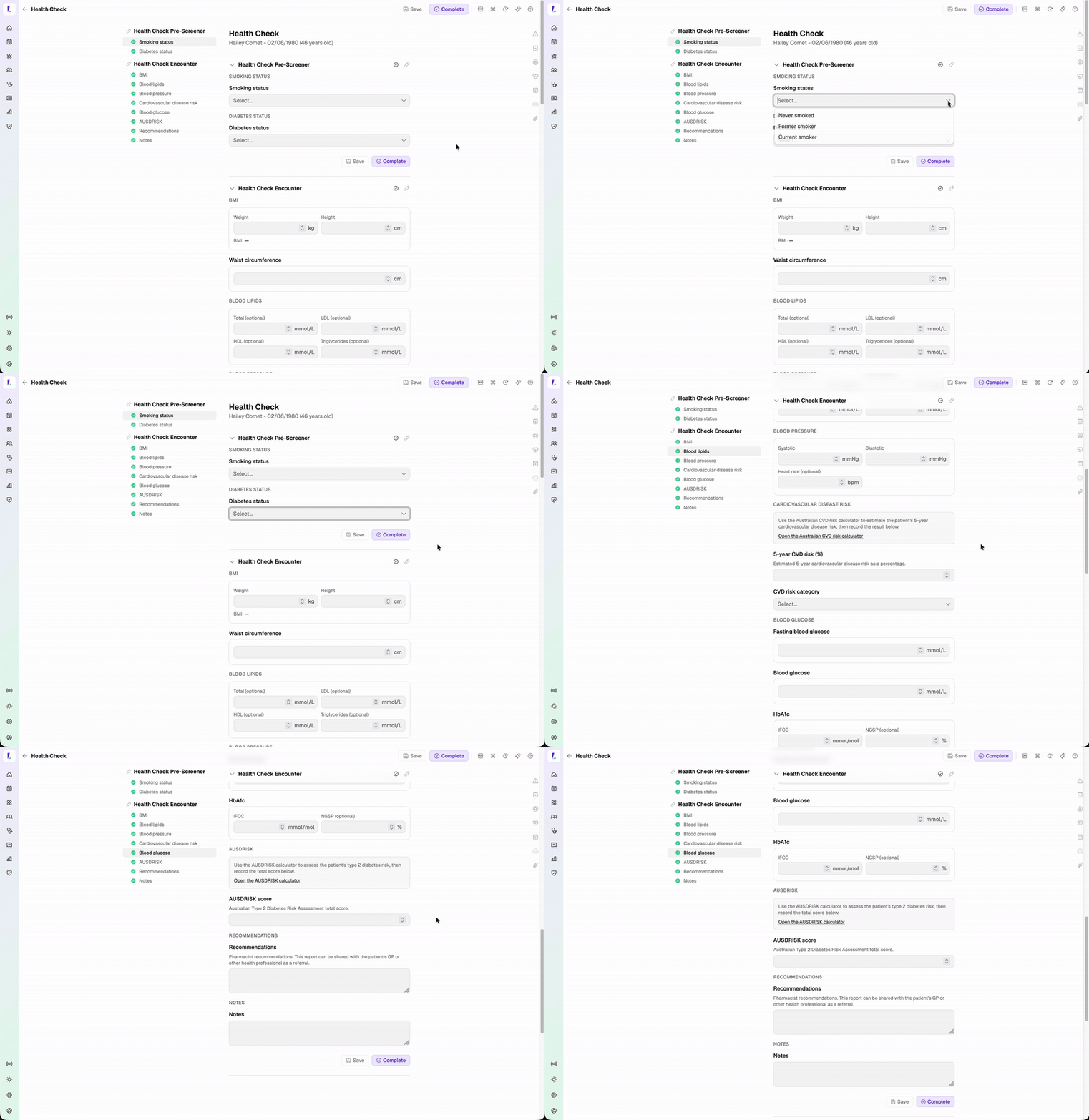
Completing a Health Check assessment capturing vitals and risk scores in a single encounter
New TerryWhite Chemmart

AIA Vitality Health Check.

AIA Vitality Health is available to TerryWhite Chemmart pharmacies. Complete the health check for AIA Vitality members and produce their AIA Vitality Health Check Patient Report.

New

Vitals recording services.

Vitals recording is now available as a set of dedicated, bookable services for individual readings:

The specific set of bookable services available may depend on your site or group's configuration. Additional vitals can also be recorded during these services where required, allowing you to capture multiple observations in a single encounter.

New

Record vitals during any service.

Record one or many vitals as part of any consultation or encounter, or add them directly to the customer’s profile. Readings are saved against the customer’s record, showing the latest value, trends over time and complete history in one place.

This lays the groundwork for expanded scope-of-practice consultations.

Available vitals include:

BMI is calculated automatically from recorded height and weight.
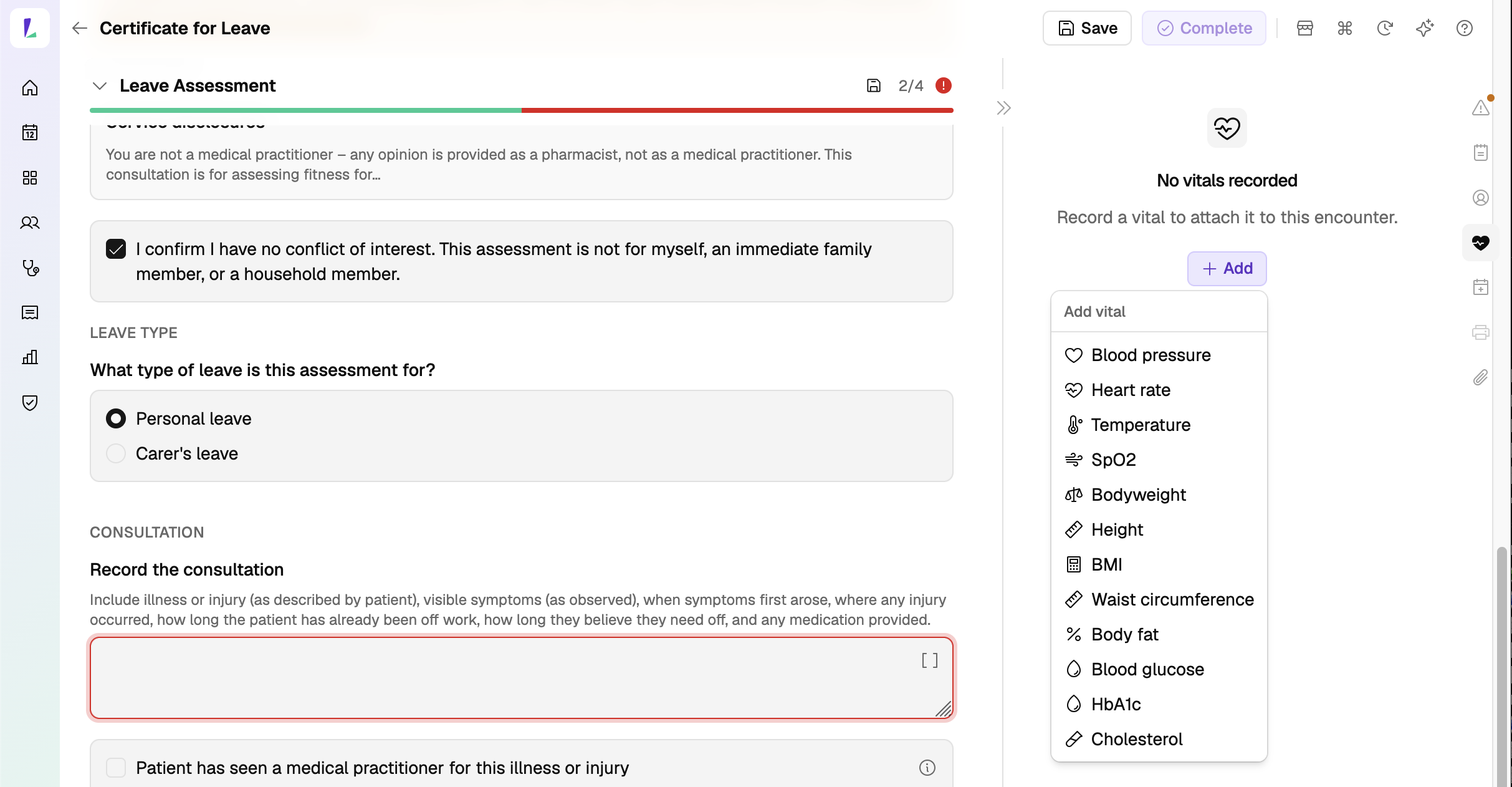
Recording a vital during a Certificate for Leave assessment, attaching it to the encounter
New

See a patient’s vitals in their profile.

Open the Vitals tab on any patient to see every vital at a glance – each shown as a card with its most recent reading and a mini trend, with the full history listed below and grouped by the encounter it was recorded in.
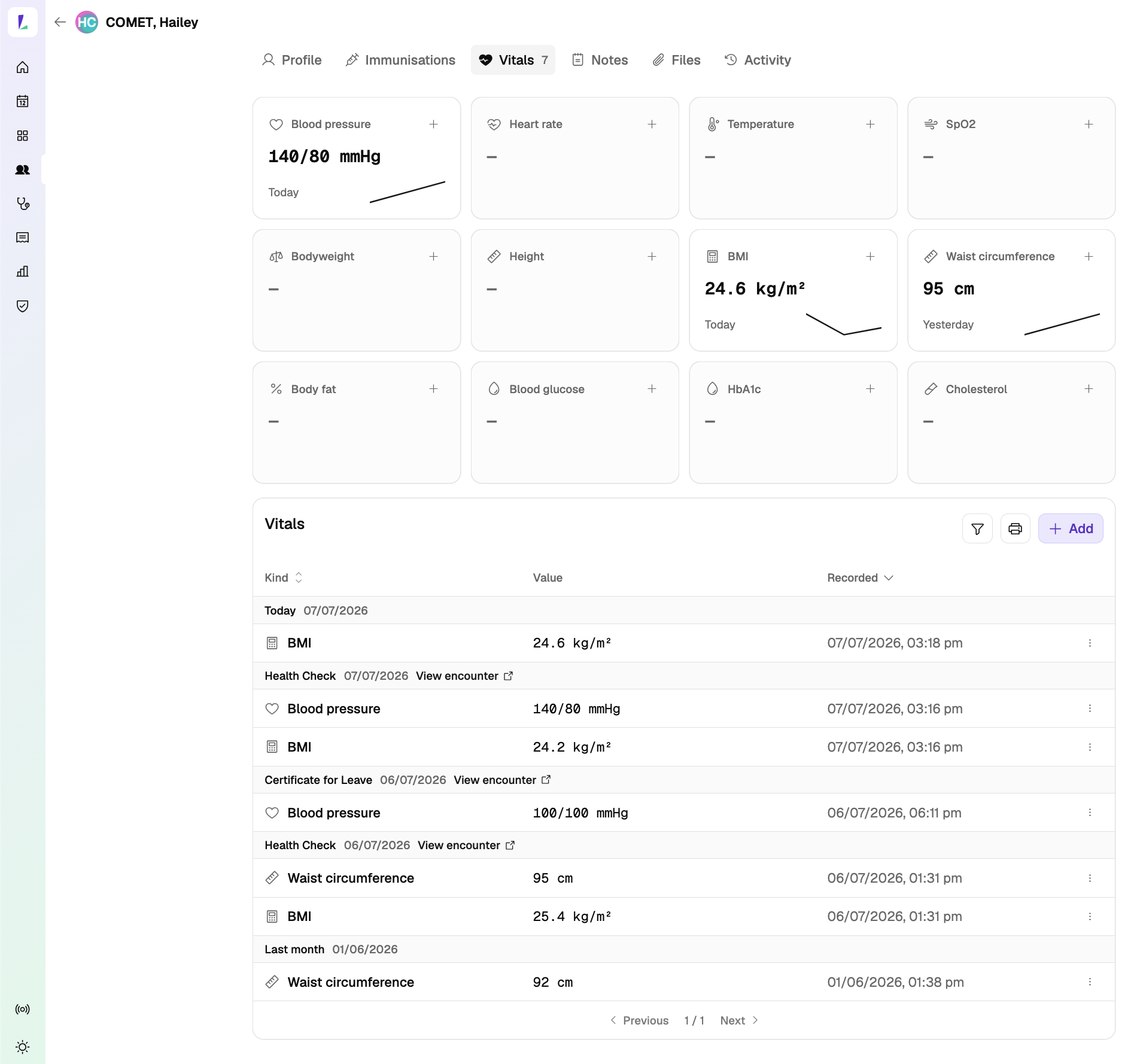
A patient's Vitals tab showing each vital as a card with its latest value and trend, and the full history grouped by encounter
New

Service Encounter Report.

A new report in the Reports section shows completed service volumes by service type, including Health Checks and Absence from Work Certificates, so you can see activity at a glance.

Select the Search icon beside a service to view all encounters for that service within the selected date range.
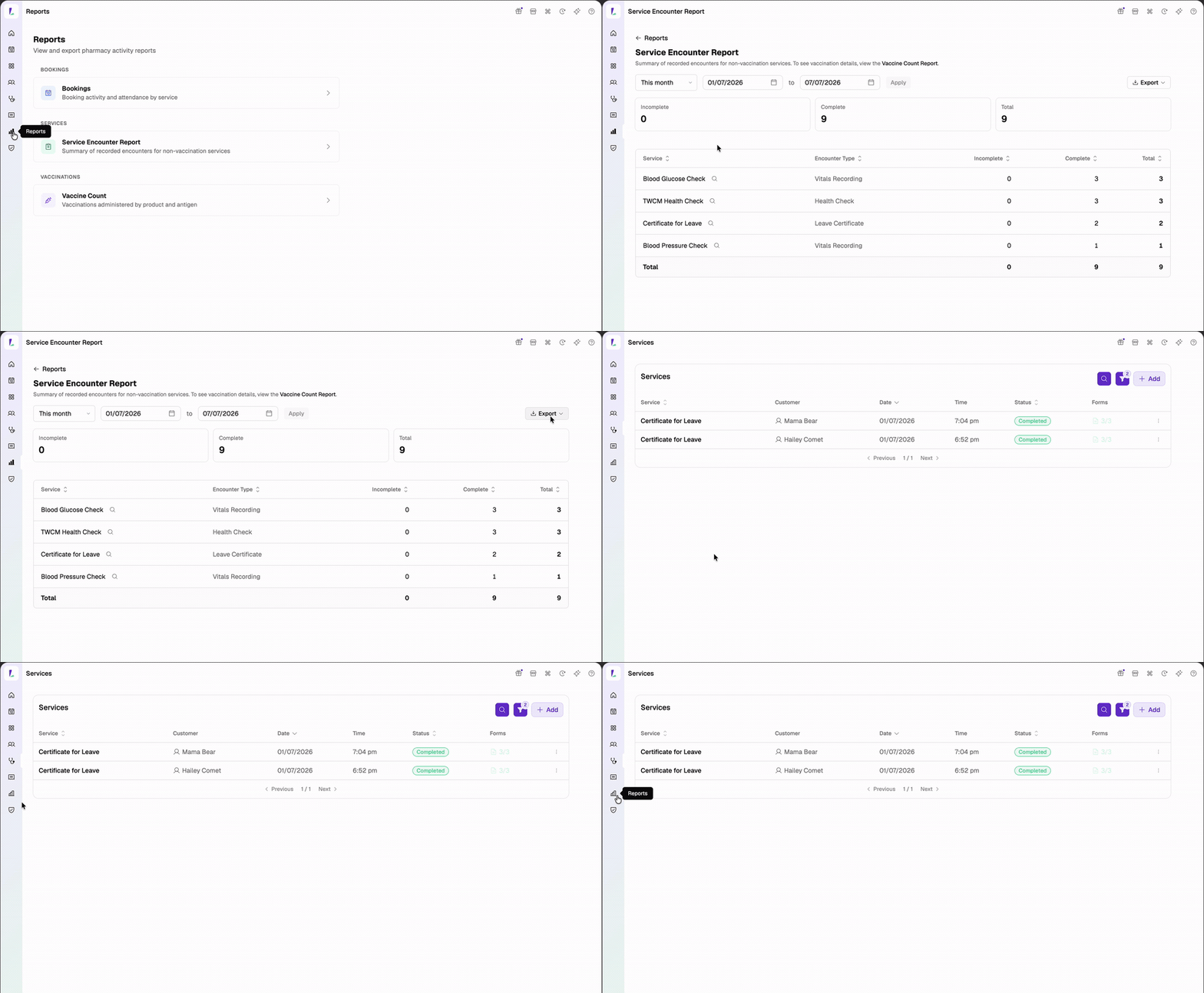
For vaccination activity, continue to use the Vaccine Count Report.
Service Encounter Report showing completed service counts with a per-service filtered list
Improvement

Absence-from-work certificates.

Certificates have been redesigned to fit neatly on a single page, with your digital signature and group branding applied for a cleaner, more professional document ready to hand to the customer.
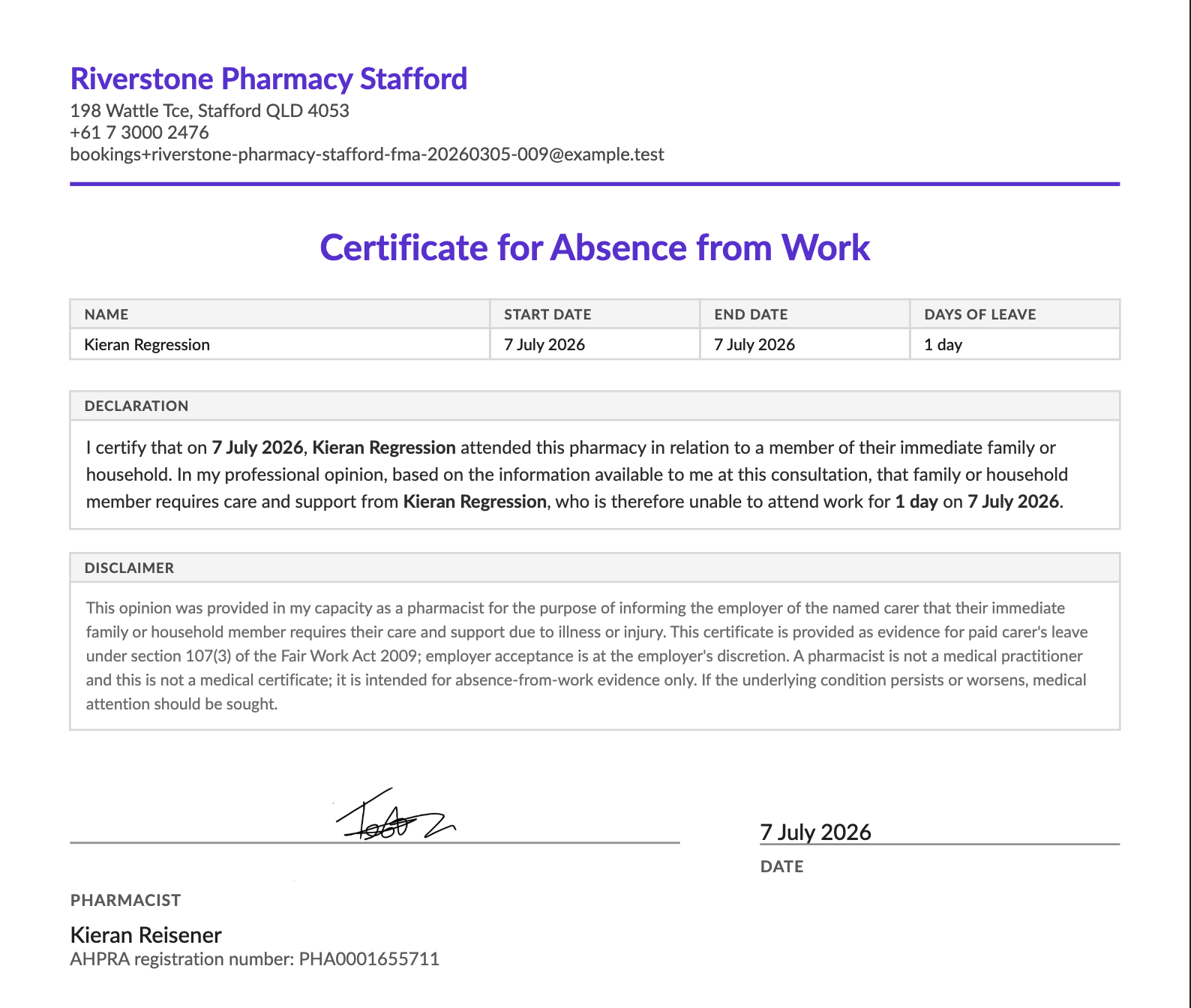
Redesigned absence-from-work certificate on a single page with digital signature and group branding
30 June 2026
New

Absence-from-work certificates.

Issue a certificate from a leave assessment. Complete a leave assessment and issue an absence-from-work certificate for personal or carer’s leave, single day or date range. The assessment is designed to support your professional obligations – capturing the customer’s informed consent and the pharmacist’s declaration.

Time-saver

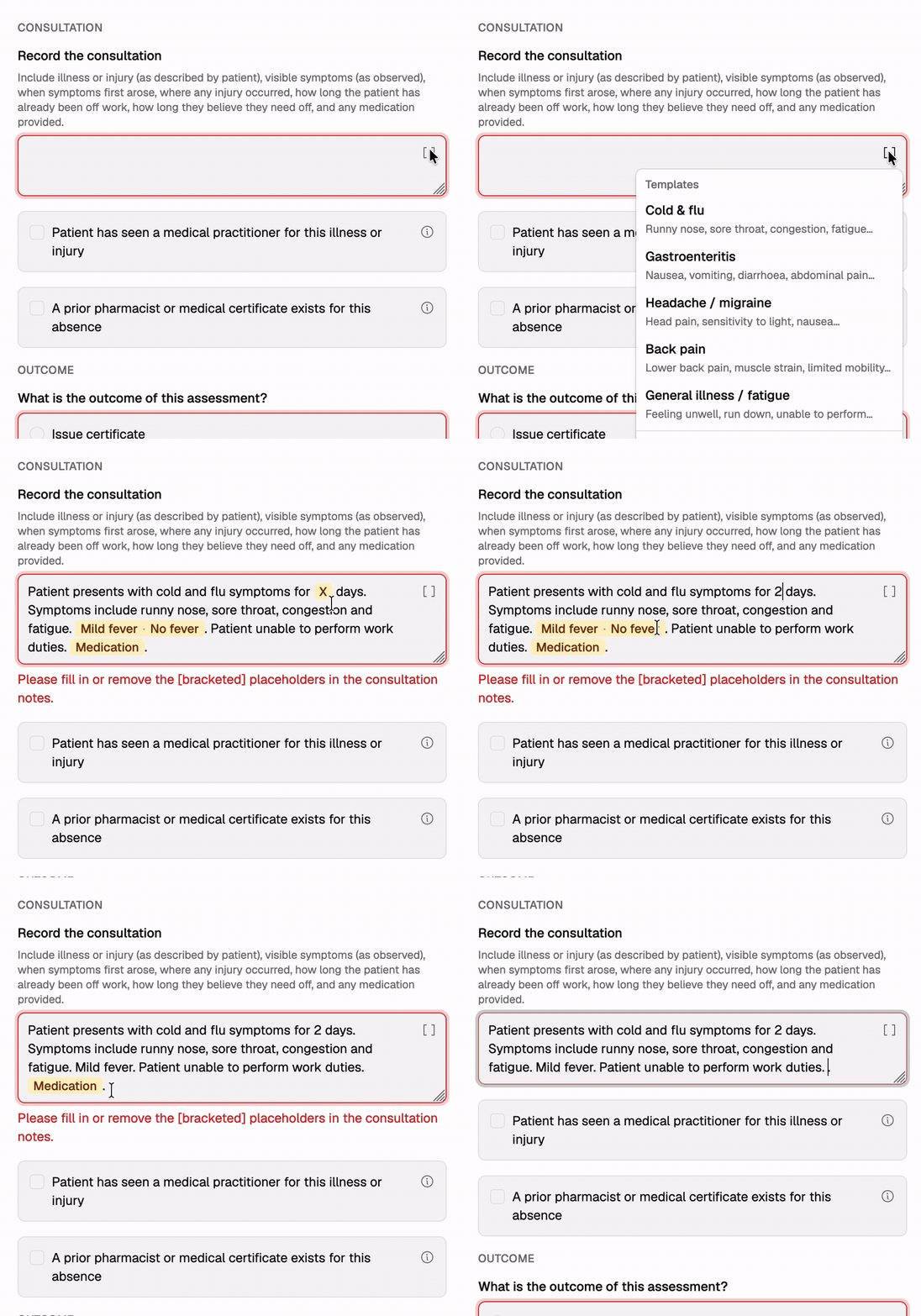
Consultation templates for common presentations – cold & flu, gastroenteritis, headache/migraine, back pain, general illness – give you a ready-made starting point to fill in the details.

Recording a leave assessment to issue an absence-from-work certificate, using consultation templates and outcome options

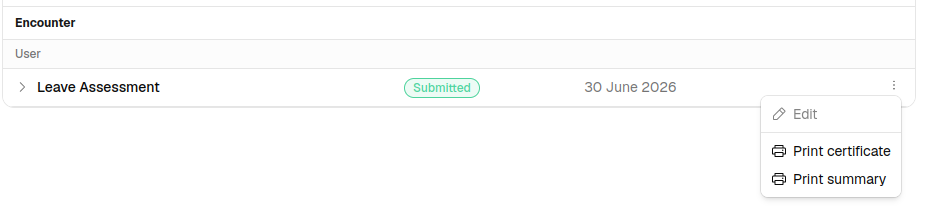
Print the certificate from the service. Once a leave assessment is completed, open the three-dot menu next to it on the service page and choose Print certificate. You can reprint it at any time.

Printing a leave certificate or summary from the three-dot menu on a completed Leave Assessment on the service page
Bright idea

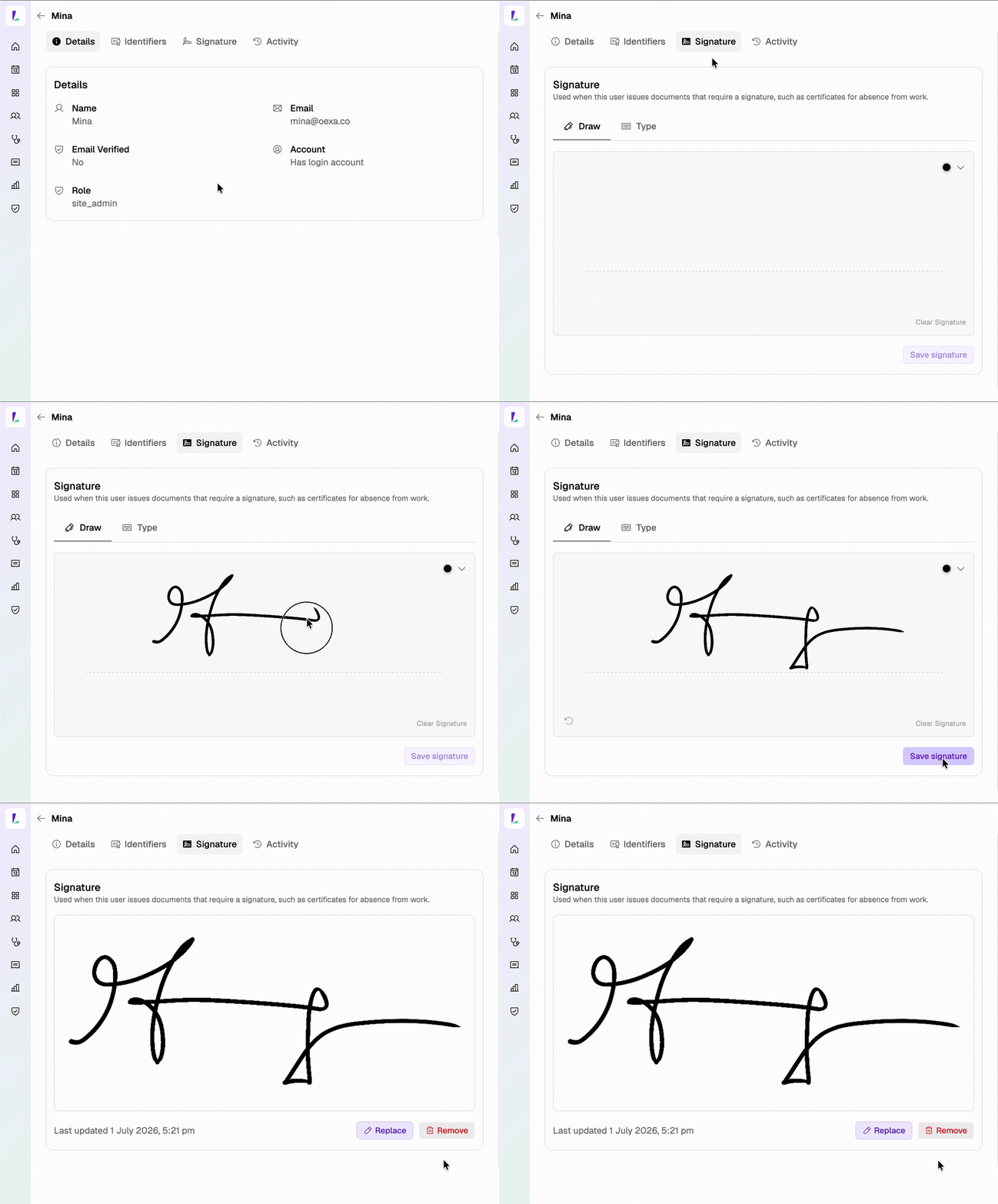
Add your digital signature to Light once and it can apply to every absence-from-work certificate you print.

Adding a digital signature to Light once so it applies to every leave certificate printed
Improvement

Small things that make a big difference.

Fix

WA Free Flu eligibility.

WA Free Flu eligibility now matches the published program rules. Interstate and international visitors, and people without a Medicare card, aged 12–64 and not otherwise covered by the NIP, are now correctly recognised as eligible. The WA residential-address requirement has been removed.

10 June 2026

Resources, the right funding, and a back button that behaves.

Plenty in this release – plus the usual round of smaller fixes and behind-the-scenes work. The big ones: resource management lands on the booking, and the vaccine funding type field gains a dedicated State Program option. And yes, the back button behaves itself now.

Improvement

Resource management for existing bookings.

A booking’s resources are no longer fixed at creation. Open a booking, tap Resources, and assign, swap, or remove a resource – no need to delete and recreate the booking.

Walk through it in Managing resources on a booking.

Shoutout to TerryWhite Chemmart Charnwood.
New

New State Program vaccine funding type.

The funding type field on the vaccination encounter form now offers three options – NIP/Commonwealth, State Program, and Other – so you can record when a dose came from a state or territory program rather than folding it in with private stock. Recording state-supplied free flu (QLD Free Flu, NSW FluMist) as State Program keeps the claim routed to the right funder.

See Vaccine funding types for how the choice routes the claim.

Fix

Bug fixes.

The back button makes more sense now. Back now follows you throughout Light, so you don’t get stuck bouncing back and forth between two screens. 😅

State flu claiming edge cases. Tidied up a few edge cases in how state flu claims are evaluated, so eligible encounters land on the right claim more reliably.

15 May 2026

Bookings flow updates.

A handful of changes that take friction out of creating, sending, and running bookings.

Shoutout to Tim Siv’s TerryWhite Chemmart Clare for the bookings workflow feedback.

Faster booking creation. The create-booking sheet now opens with a time slot already selected – the slot you clicked, or the current time using the offering’s default duration – so you can schedule in one click. Resources have moved out of the Advanced section onto the main form, and a new Booking Created toast lets you jump straight to the booking detail page.

A dedicated Send to kiosk experience. After scheduling a customer-less booking, a new Send to kiosk sheet opens with a QR code, a copy-link for the public booking URL, and a live status list of every paired kiosk on the site (Online, Busy, or Offline). Hand the booking off to an idle kiosk in one click. Busy kiosks require a Force confirmation.

The per-service three-dot menu on the booking detail page also has a Send to kiosk action so a specific service can be sent on its own.

External-match customers are now editable. When you pick a customer from an AIR search, the form prefills the source-provided fields (name, DOB, Medicare number, address) and locks them, then drops you into the details phase to fill in the remaining fields. Previously the customer was created immediately, which meant any missing fields had to be edited afterwards.

Unified Add attendee picker. The Add attendee / Add service sheet on a booking now uses the same customer picker as Create Booking. Click Add customer, the standard find-or-create form opens, and the chosen customer renders as a row with avatar, name and DOB – consistent with the rest of the app.

Run sheet — a row per attendee for group bookings. Group bookings used to appear as a single row on the run sheet showing only the booker. Now each attendee gets their own row with their service, status, voucher and forms – tied together with a left bar and a “Group of N” label on the first row. Single-service bookings look the same as before. Prints cleanly in black and white.

Vaccination Encounters.

The encounter screen now surfaces what the platform already knows before you submit, and offerings can pre-shape it for you.

Alerts and Claim eligibility side panels. Two new panels on the encounter screen. The Alerts panel highlights things to look at before completing the encounter – missing Medicare, missing postcode, schema-defined warnings such as pregnancy considerations – and shows a dot on the rail when anything qualifies. The Claim eligibility panel previews which programs (NIPVIP, CVCP, QLD Free Flu, NSW Free FluMist, WA CPIPP) would accept the encounter on submission, with a clear reason when something isn’t applicable. Region gating means out-of-area programs never appear.

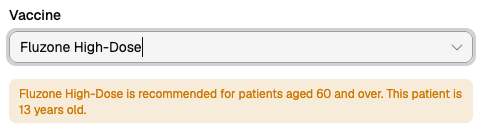
Default vaccines per service offering. Each offering can now override its default vaccine codes – Inherit from the service, Custom, or None. The encounter pre-fills the resolved codes for every new customer service. Particularly useful for sites running multiple variants of the same service for different brands or schedules.

Auto-navigate to the encounter on Add Service. When you create a standalone customer service via Add Service, and the service has encounter-phase forms (and you have the Record Encounter feature), the app now takes you directly to the encounter instead of the service detail page.

Edit the customer from the encounter. Customer details can now be edited from a popover on the encounter screen, without leaving the encounter.

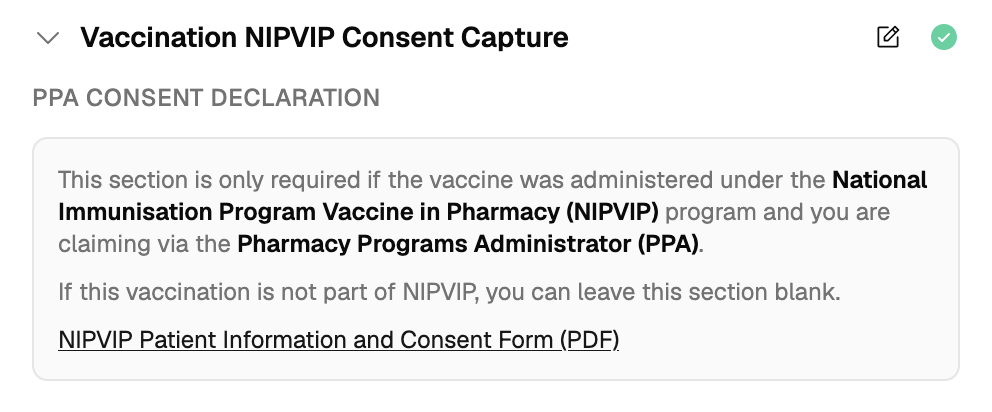
NIPVIP consent form links to the official PDF. The NIPVIP consent form rendered in the encounter now includes a link to the official PPA-hosted Patient Information and Consent Form PDF in its info block.

Customers improvements.

Edit customer from more places. The Edit Customer sheet is now reachable from several spots that previously required navigating to the customer profile page first – the booking detail page (pencil next to the patient or booker), the service detail page (pencil next to the customer), the Attendees list (Edit in the per-row menu), and the Customers list (Edit in the per-row menu).

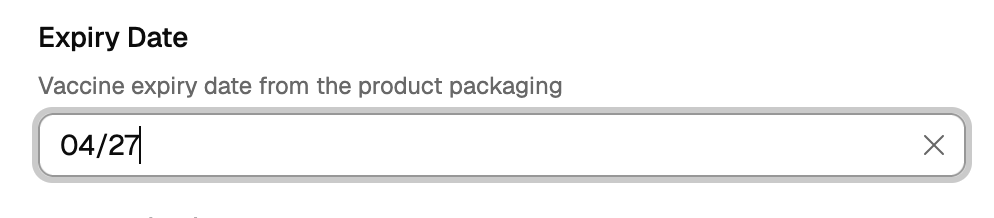
Medicare field improvements. Spaces are stripped from the input on completion, and the 11th digit is automatically placed into IRN – fewer keystrokes per registration, fewer mistakes.

Suggested by TerryWhite Chemmart Kingsley.

AIR addresses are now enriched. AIR customer lookups can return partial addresses – missing region, missing postcode, and never a state. The platform now backfills missing fields using the suburb/postcode lookup wherever an address is returned or saved, so customer records carry complete addresses regardless of the source.

Improvement

Claims & Programs.

Improvement

Small things that make a big difference.

7 May 2026

Bookings workflow updates.

Supporting you with how you manage bookings on the day.

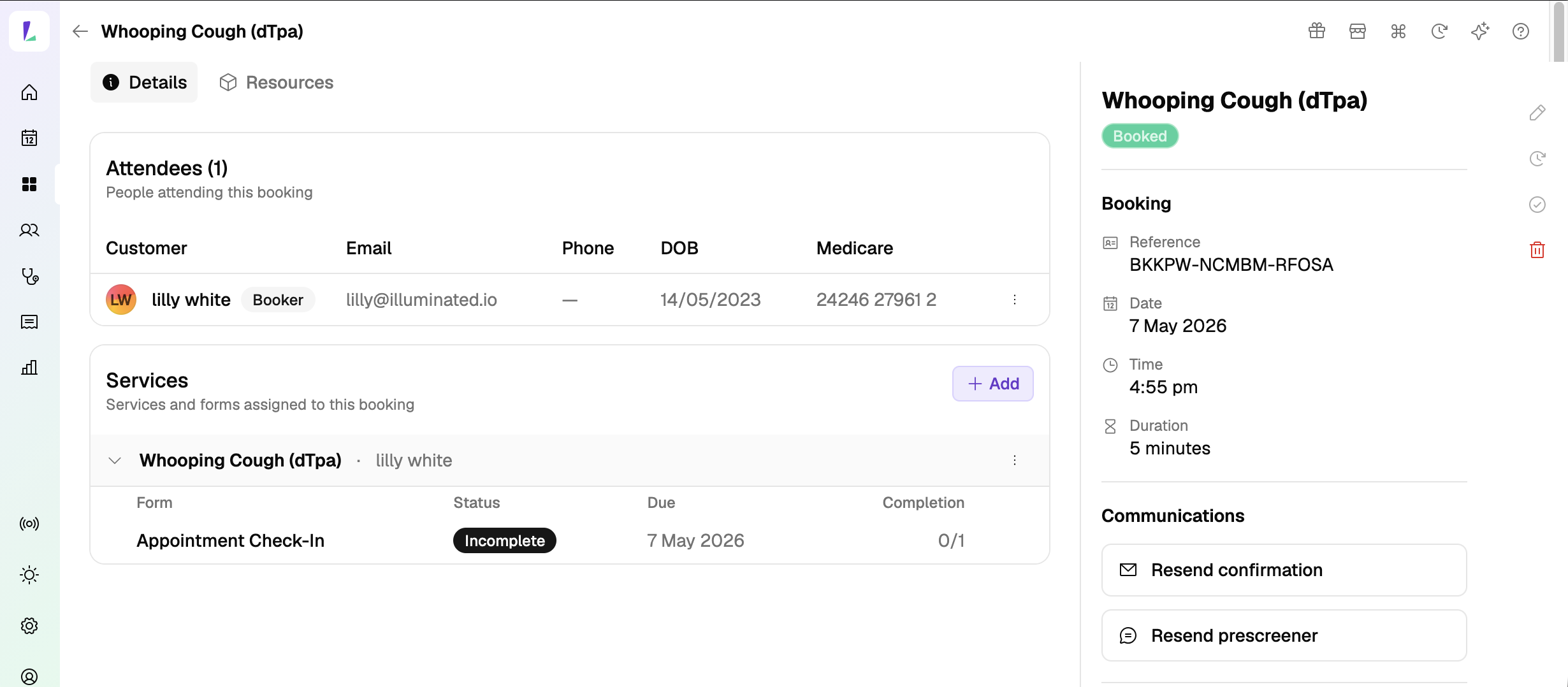
Resend a booking confirmation or prescreener on demand (email only). From the booking detail page, you can now manually trigger booking events. If a patient didn’t get the confirmation, or didn’t complete the prescreener before they arrived, resend it directly so they can pick it up on the spot.

Resending a booking confirmation or prescreener from the booking detail page

Reschedule from the availability calendar. When a patient needs to move their appointment, open the booking and pick a new time from the live availability selector – the same view you use for new bookings, with free slots visible at a glance.

Print a blank service form. Print a clean blank service form for any service.

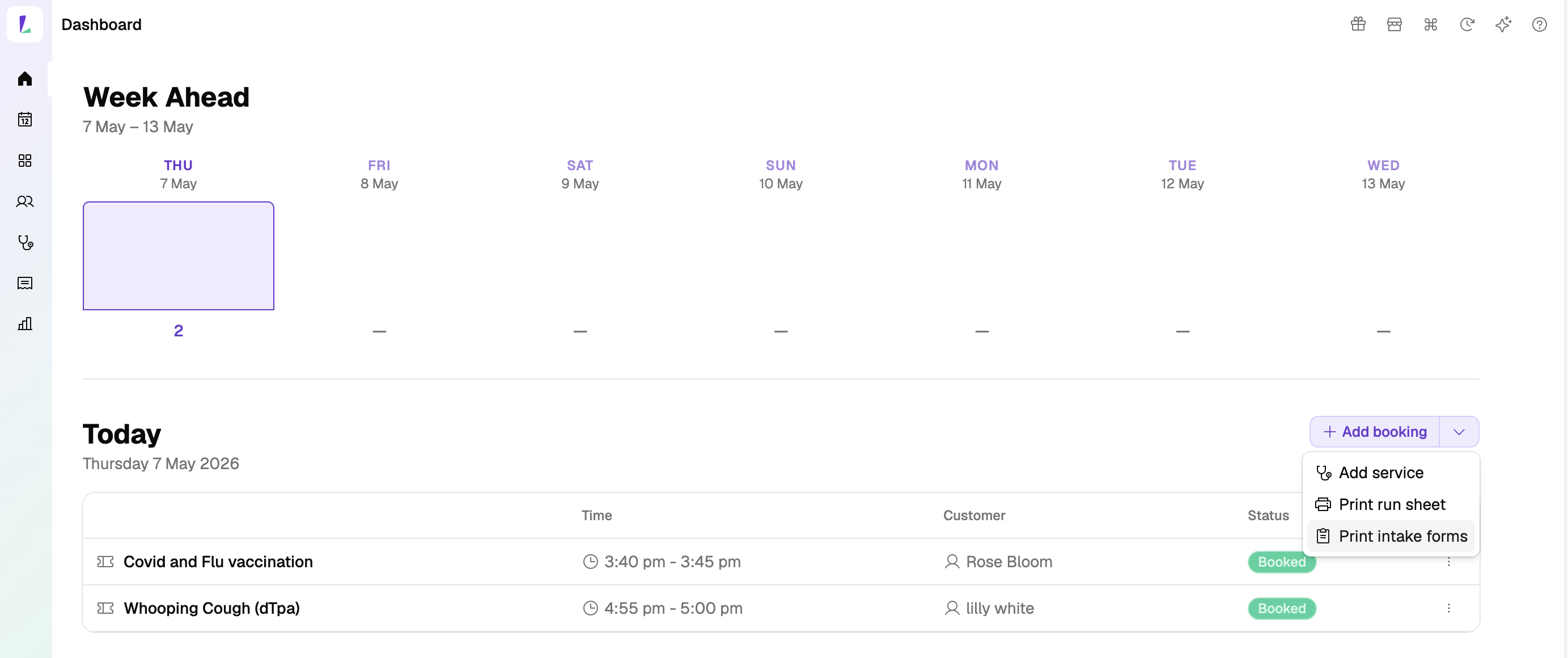
Bulk print prescreeners for the day from the Dashboard. Print prescreener forms in bulk, pre-filled with each booking’s customer details. Got 100 bookings lined up for tomorrow’s flu clinic? Print every prescreener in one go from the Dashboard, already labelled with the right patient on each.

Shoutout to TerryWhite Chemmart Coffs Harbour for the bulk prescreener print idea.
Bulk-printing prescreeners from the Dashboard, pre-filled with each booking's customer details
Improvement

Claims screen: choose what you see.

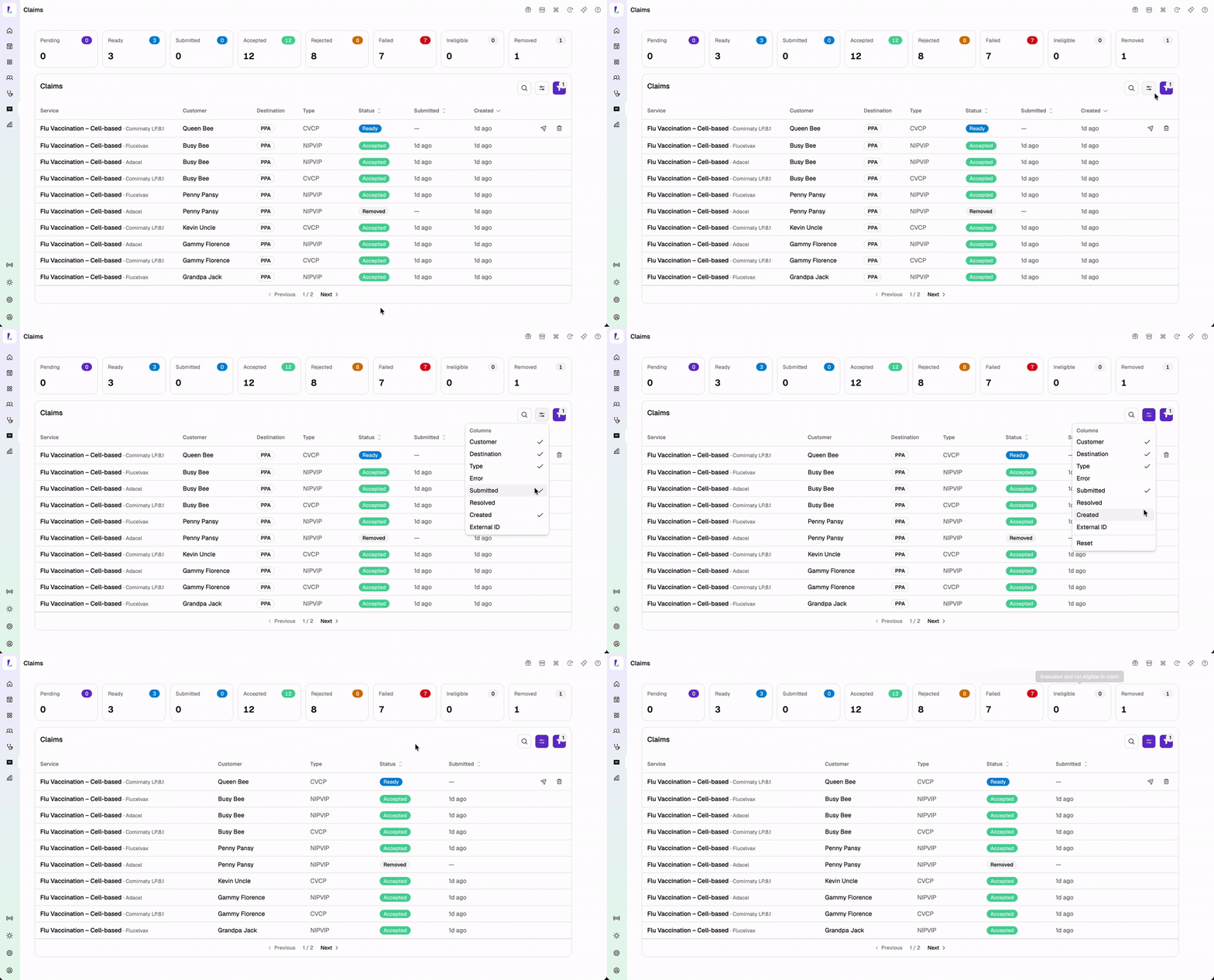
In the Claims screen, you can now pick which columns appear and see the vaccine name directly in the table. Sticky actions keep the service, vaccine, and key actions in view on smaller screens, so you never lose sight of what matters.

Set up the Claims screen the way you want!

Choosing which columns appear in the Claims screen, with sticky actions on smaller screens

Vaccination Encounters.

  • NIPVIP Patient Information and Consent Form is now available on the vaccination encounter record.
  • Additional Immuniser declaration fields on the vaccination encounter record – for TerryWhite Chemmart.
NIPVIP Patient Information and Consent Form on the vaccination encounter record
Improvement

Small things that make a big difference.

5 May 2026
New

Automatic PPA claim submission for enrolled programs.

Once you’re enrolled and your agreements are signed, eligible claims submit to PPA in the background. After a completed vaccination encounter, the claim moves from Ready to Pending automatically.

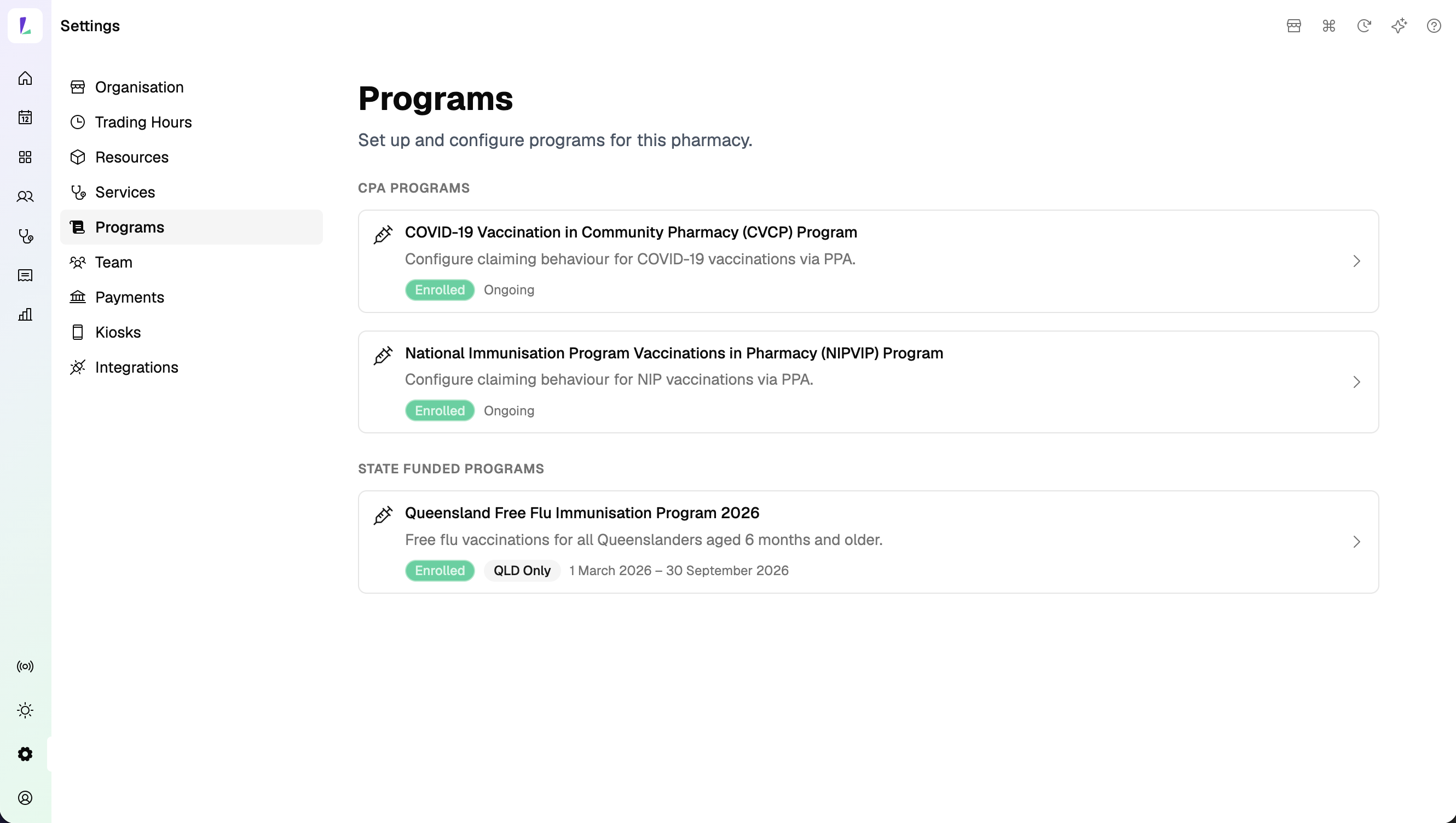
To set this up, head to Settings › Programs – read the agreement and program rules, provide your consent, and complete the required information to enrol into the program.

Programs settings showing the master automated claims agreement
New QLD Program

Queensland Free Flu Program — setup for claiming & invoicing available.

Claims from 1 May onwards will be included in the next batch run on 15 May – we’ll let you know if this changes.

For Pilot sites – we’ll work with you directly on claims from the pilot start date through to the end of April.

Claims are processed by Queensland Health – please contact them directly with any questions about your claim.

To set this up, head to Settings › Programs – read the agreement and program rules, provide your consent, and complete the required information to enrol into the program.

New NSW Program

NSW Free FluMist Program — setup for claiming available.

Light reports the total number of eligible FluMist claims sitting as Ready to Pharmacy Brands Australia (PBA) – for any questions, contact the Light Support Team.

To set this up, head to Settings › Programs – read the agreement and program rules, provide your consent, and complete the required information to enrol into the program.

Expect more interface changes around programs and claiming as we have feedback from pilot sites to continue to improve on.

Improvement

Bookings improvements.

Improvement coming this week: the QR code and booking link panel will appear automatically when you create the booking, so you won’t need to open the booking to grab the link.
Fix

Bug fixes.

A handful of smaller fixes have gone out in this release covering:

Coming up

What’s on the horizon.

Dispense integration. Connecting Light to your dispense system – so dispense records become another source for finding patients, alongside your existing customers and AIR.

Workflow improvements from pilot feedback. Expect more interface changes around programs and claiming as feedback from pilot sites helps us refine the experience and improve everyday workflows.

1 May 2026

Vaccination updates.

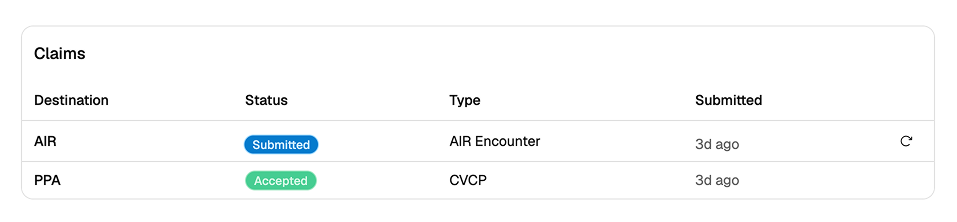
Claim status update – Skipped is now Ineligible. The Skipped claim status has been renamed to Ineligible to better reflect what it means – the claim was evaluated but did not meet the eligibility criteria.

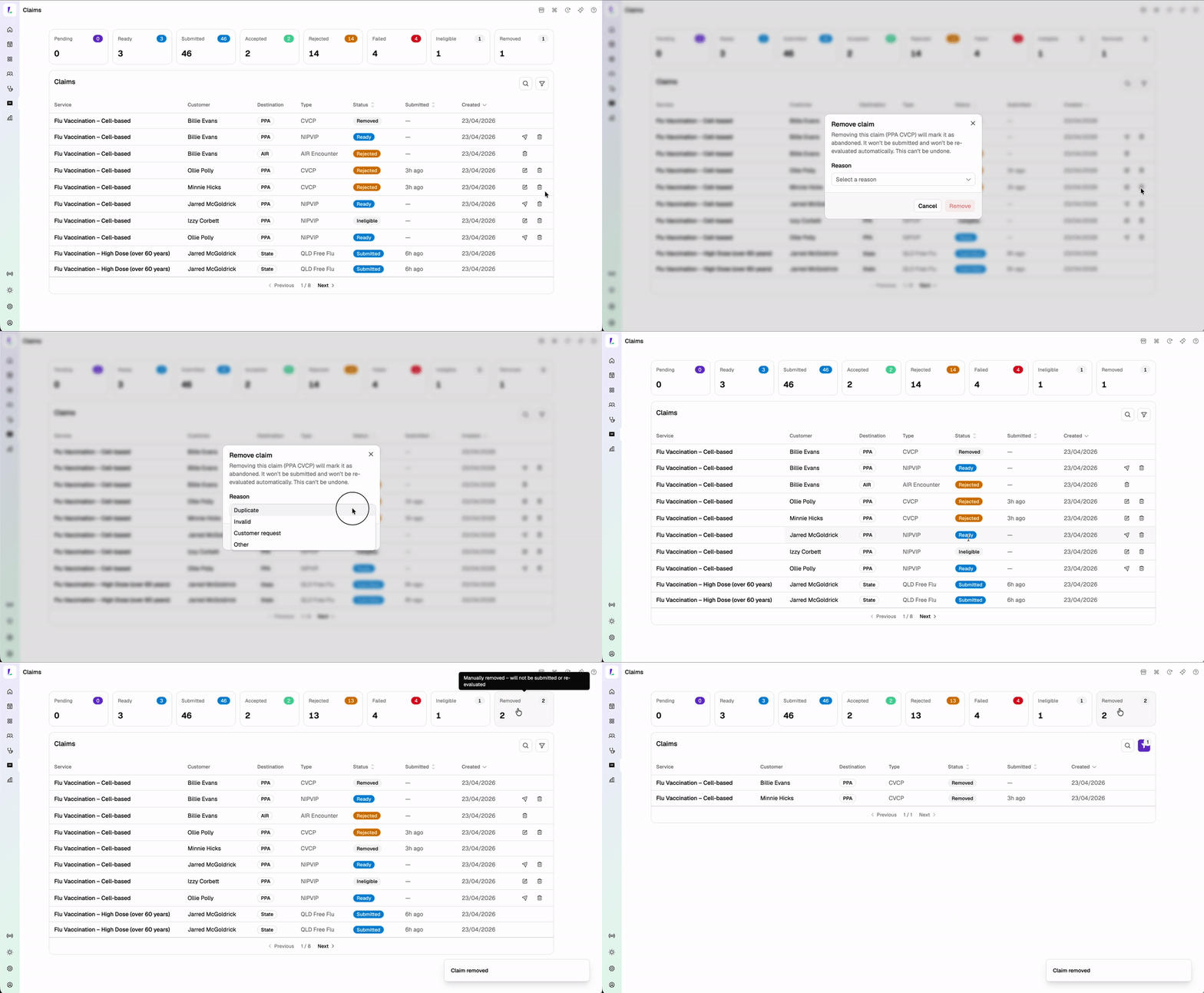
Removed is a new claim status. You can now remove a claim and provide a reason when it is no longer valid. Removal is not available once a claim has been Accepted or Submitted to the funder.

Renaming Skipped to Ineligible and removing a claim with a reason

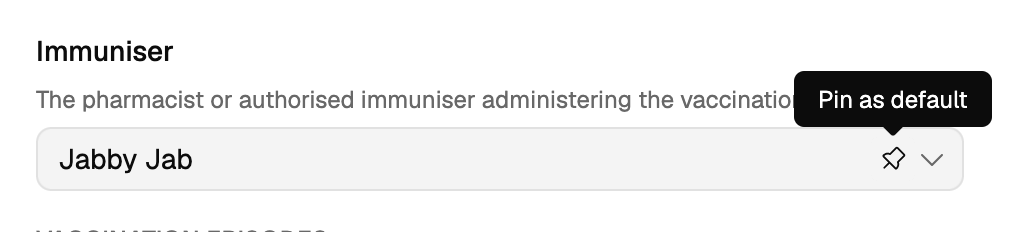
Pin your immuniser. You can now pin the immuniser field so it carries through to each encounter automatically. Ideal for busy flu clinic days where the same immuniser is recording back to back.

Shoutout to TerryWhite Chemmart Carina Day and Night for this one.
Pinning the immuniser field on a vaccination encounter
New

Find patients from your records or the Australian Immunisation Register.

When adding a booking or service, customer search now returns both your existing customers and patients found in AIR – reducing duplicate records and saving time for returning patients.

Note: AIR results will only appear if your site has AIR enabled. Once the Dispense integration is complete, dispense records will be added as another source for finding patients.

Bright idea

Search at the speed of Light.

Tap Ctrl K (or K on Mac) from anywhere in Light to open your universal search bar – find patients, bookings, services, even Help content without leaving your screen.

One shortcut to find them all.

New

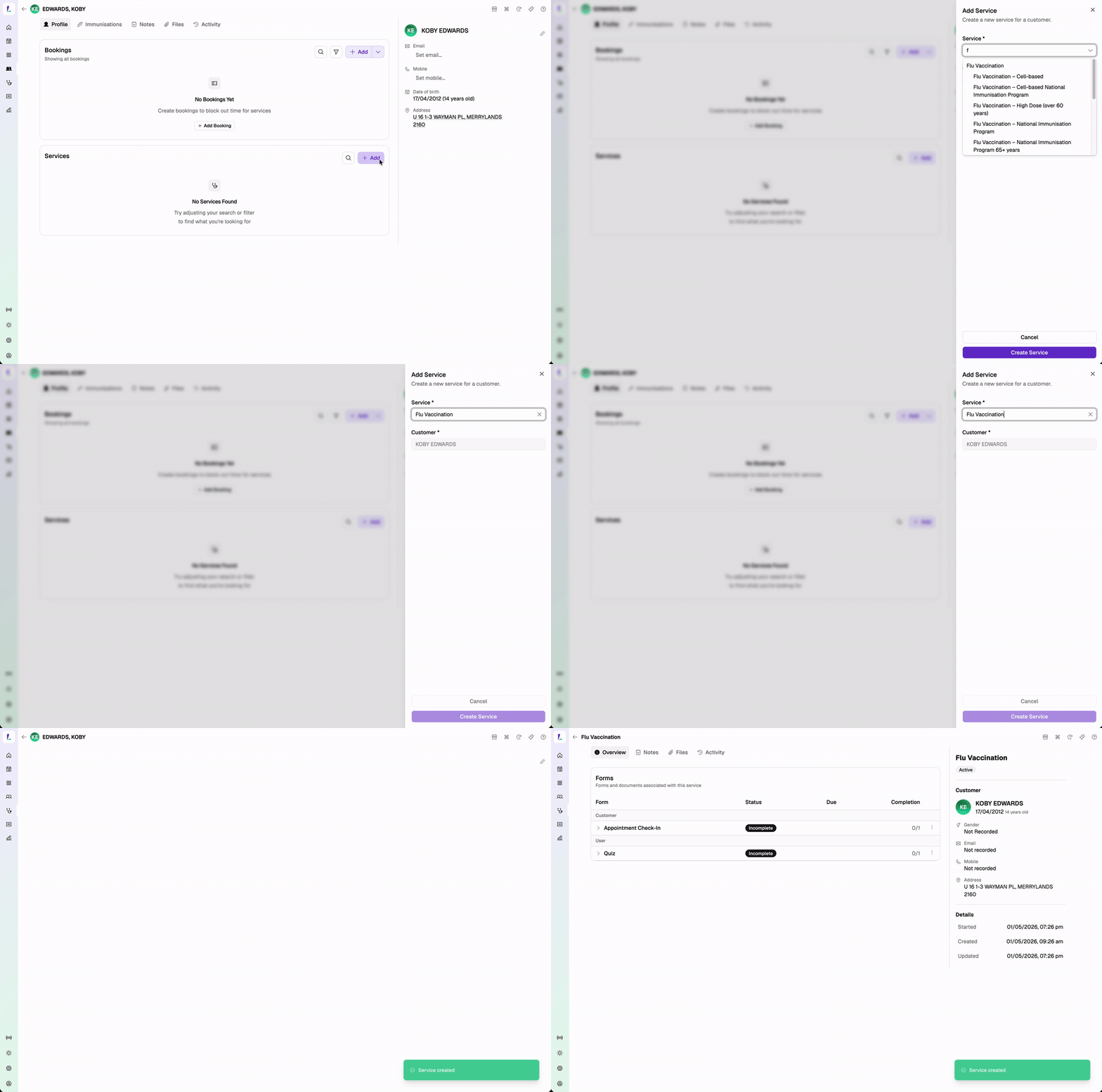
Start a service without a booking.

You can now start a service directly without a booking attached – useful for walk-ins without having to block out time in your calendar or resources first.

Starting a walk-in service without a booking
Improvement

Kiosk improvements.

Improvement

Small things that make a big difference.

24 April 2026

Vaccination updates.

Light is ready for Respiratory Syncytial Virus (RSV) NIPVIP claiming through PPA from 15 May 2026. Following the government announcement, RSV vaccinations for older Australians administered with AREXVY will be covered under NIPVIP from 15 May. From that date, RSV NIPVIP claiming will work automatically – no action needed on your end.

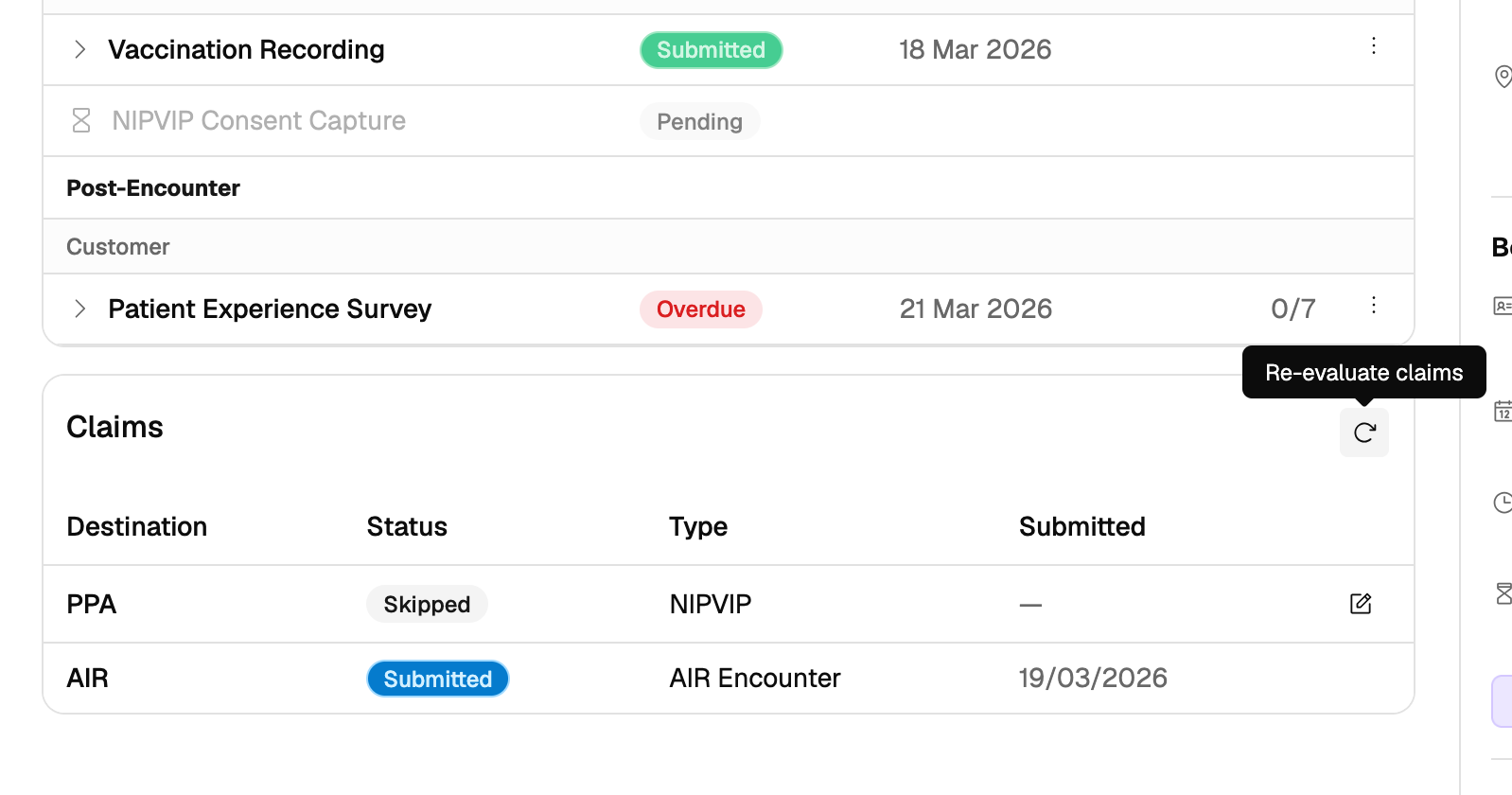
Claim re-evaluation now available. You can now re-evaluate claims on a vaccination service – Light will attempt to create missing claims, reopen skipped claims that are now eligible, and remove claims that no longer apply. You can edit the vaccination encounter and resubmit.

Claim re-evaluation on a vaccination service

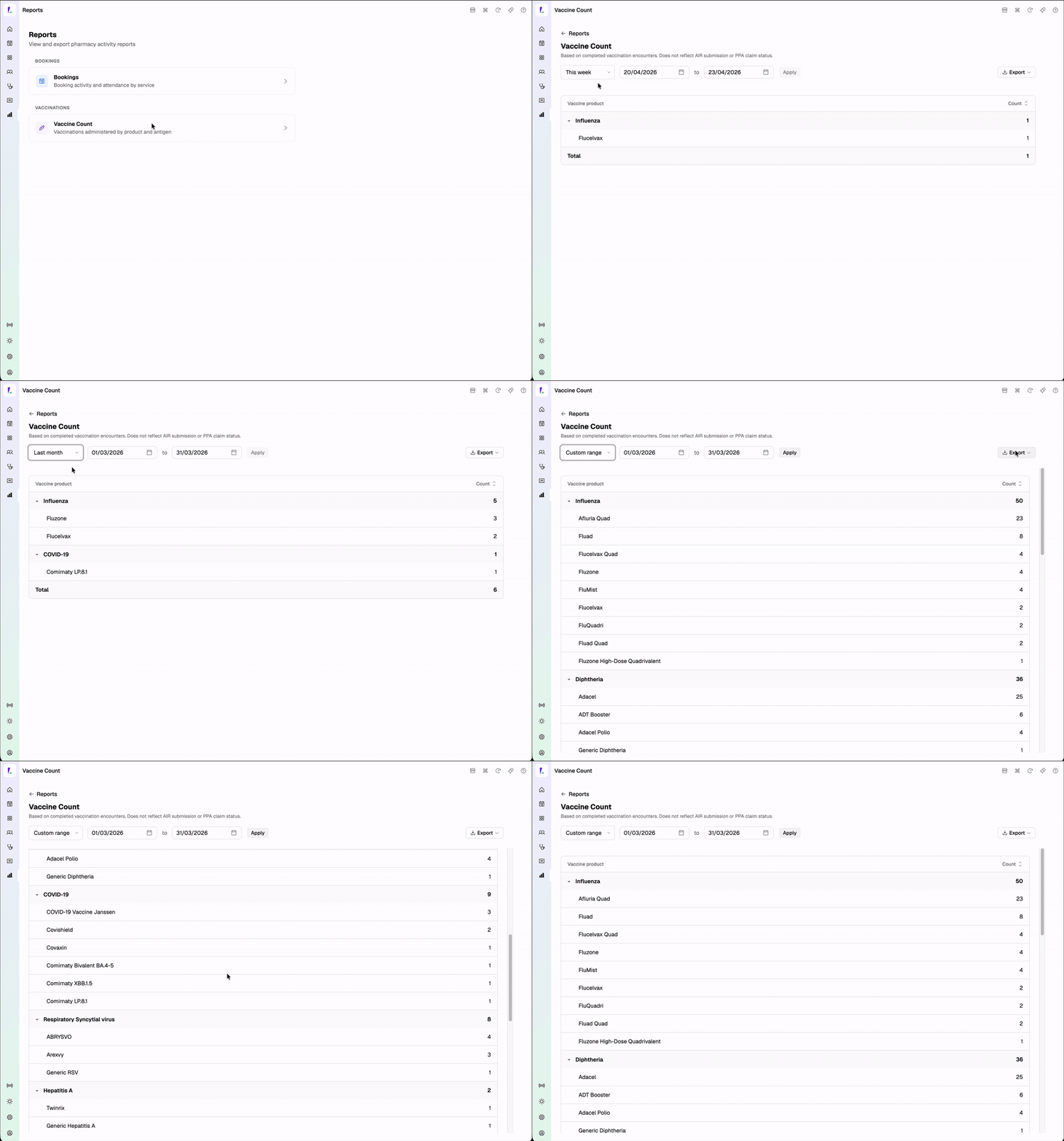
Vaccine Count report. See how many vaccinations were recorded, grouped by antigen, across a selected date range. Export to CSV or print. Find it in the new Reports section.

Vaccine Count report grouped by antigen across a selected date range

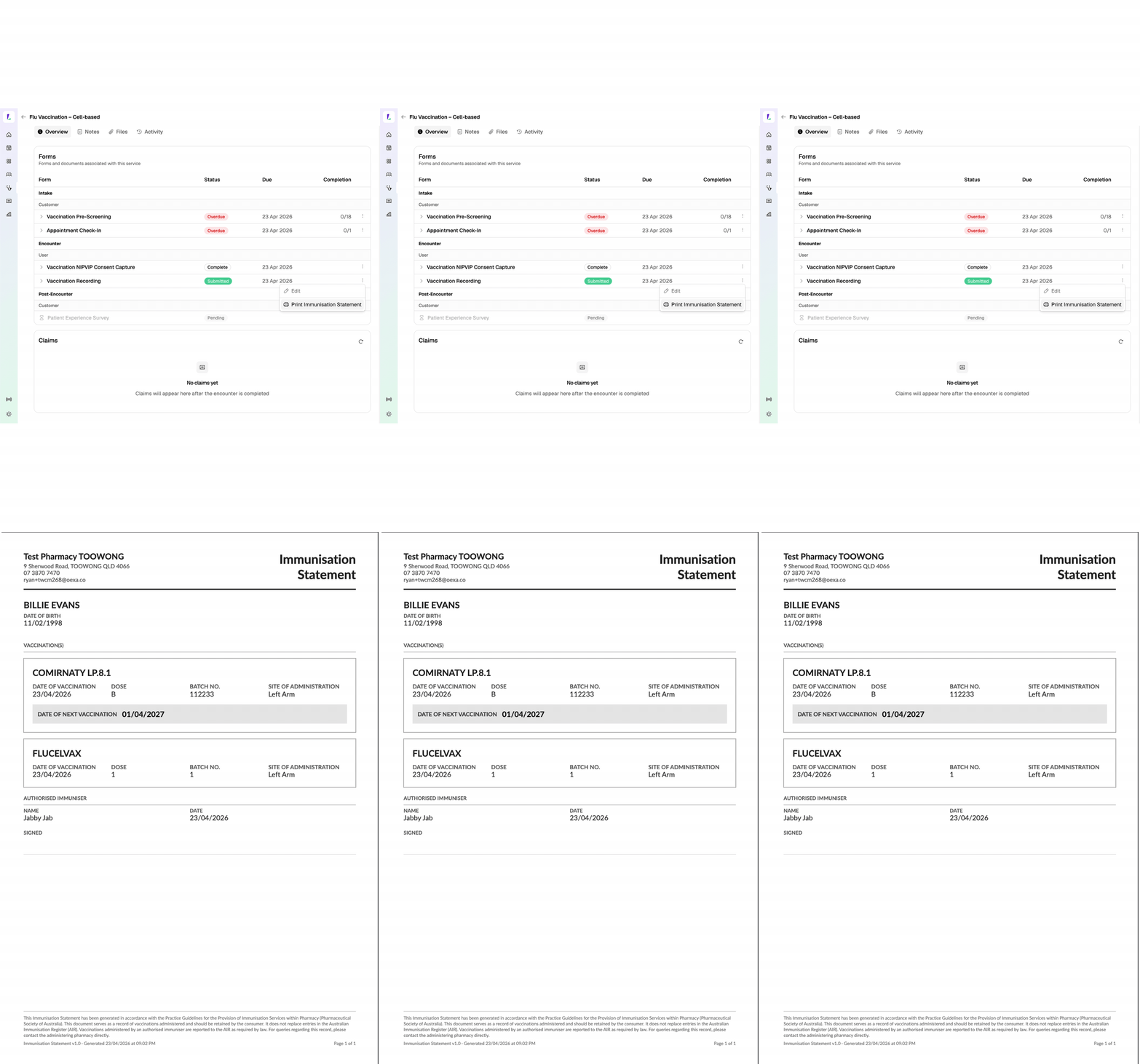
Print Immunisation Statement. A patient-friendly Immunisation Statement can now be printed directly from a completed vaccination encounter. If multiple vaccines were given in the same encounter, they all appear together on a single statement.

Printing an Immunisation Statement from a completed vaccination encounter
New

Reports section.

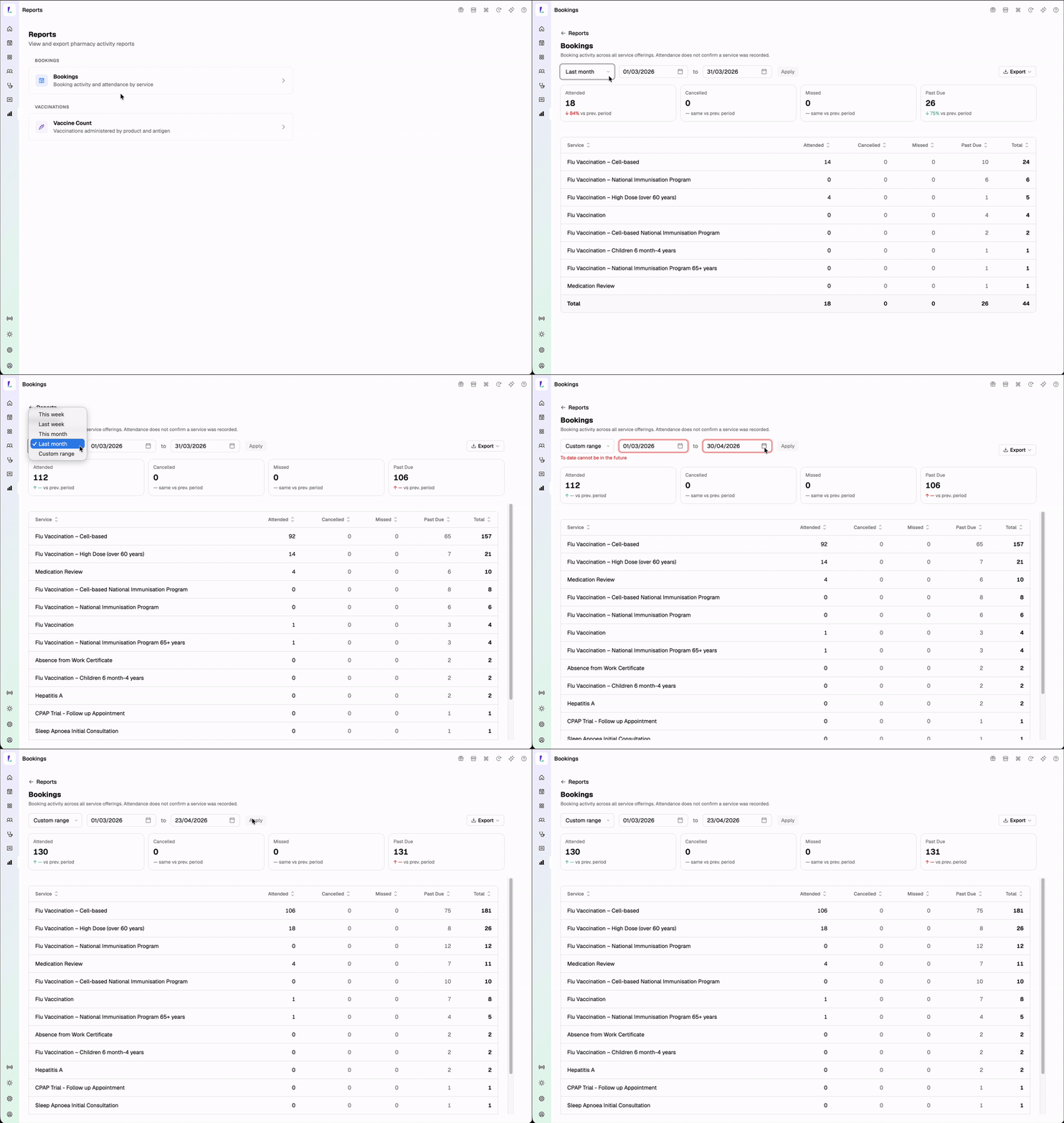
Two new reports are now available in the platform – Vaccine Count (see Vaccination updates above) and the Bookings Report:

  • View bookings grouped by service offering across a selected date range.
  • Compare against the previous period to track trends.
  • Track demand and booking activity across your services.
  • Identify no-shows and unresolved bookings.
  • Export to CSV or print.
Bookings Report grouped by service offering with period comparison
Improvement

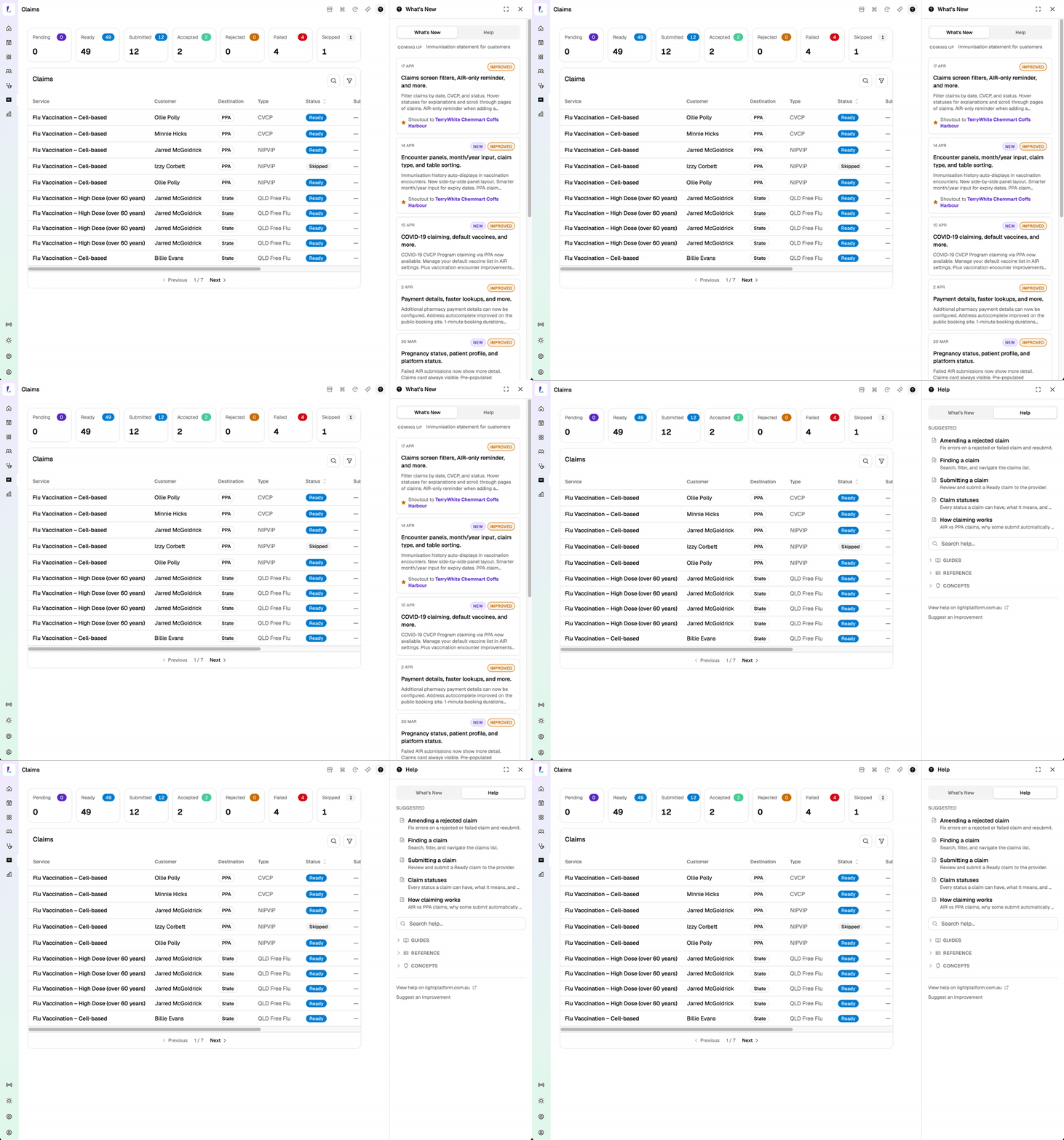
What’s New and Help moved to the top right.

  • Better support when you need it. Help and software updates are now easier to find, moved to the top right utilities menu so they’re always within reach.
  • Gift box indicator. A gift box icon appears for 5 days when there’s a new software update, so you never miss what has changed.
  • Help is now contextual. If you’re on the Bookings page you’ll see Bookings help; if you’re on Claims you’ll see Claims help.
  • Flag or suggest improvements directly from the help content. Some of the content has been refreshed with the help of AI.
What's New and contextual Help in the top right utilities menu
New

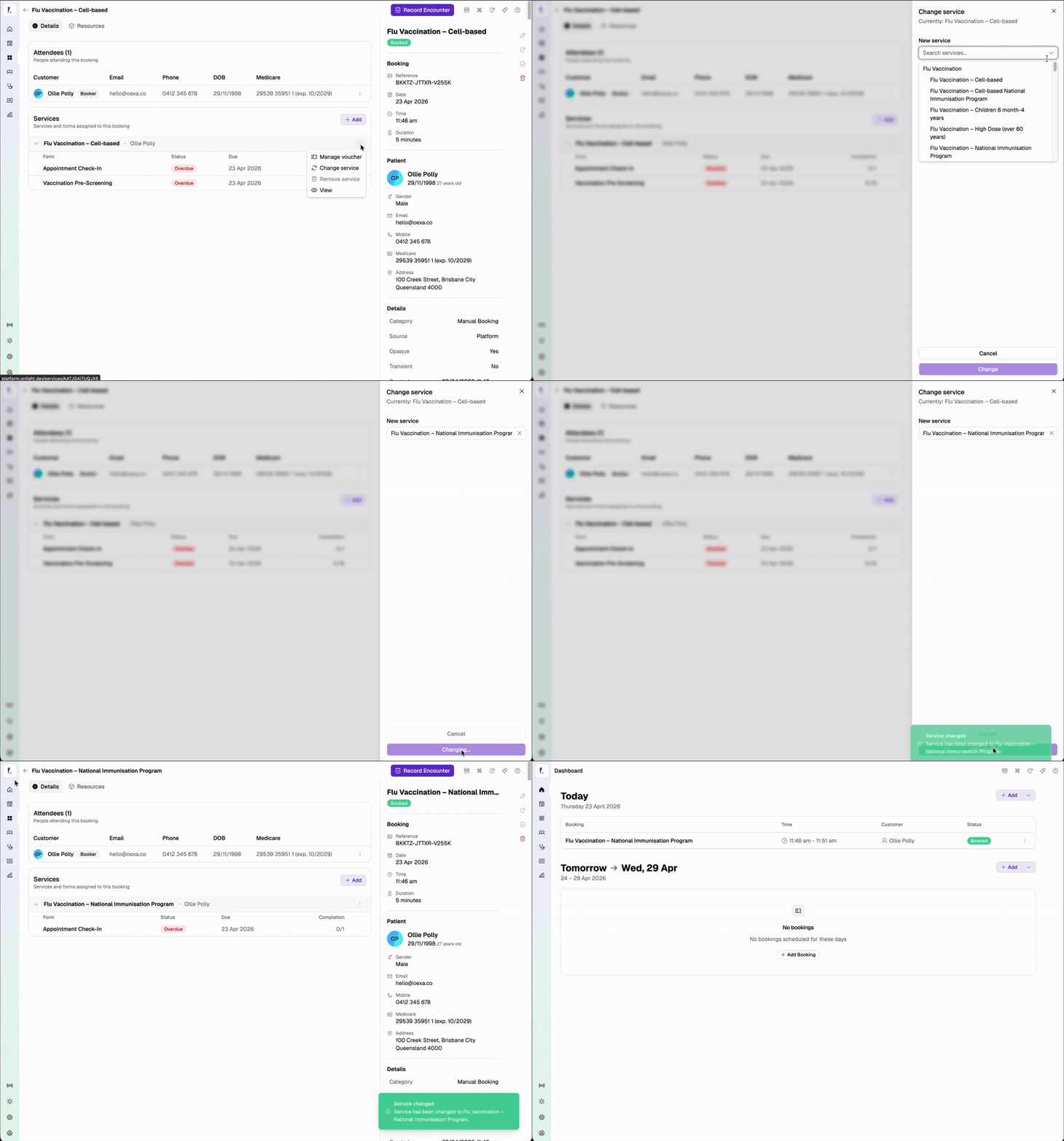
Change services on existing bookings.

You can now manage services directly from the booking detail page – swap to a different one. For example, if a patient books for a flu vaccination but the appointment is actually for a COVID-19 vaccination, you no longer need to cancel and create a new booking – just change the service on the existing one. You can also add or remove a service.

Changing a service on an existing booking from the booking detail page
New NSW Program

NSW Free Intranasal (Limited) eligibility now evaluated at the point of vaccination.

When you record a Vaccination encounter with FluMist® for a NSW resident aged 2, 3, or 4, Light will check the patient against the program’s eligibility criteria and, where they qualify, create a claim. This is foundation work ahead of the NSW Free Intranasal (Limited) program going live in Light.

Heads up: These claims will show as Ready in your Claims screen, but Light won’t submit them yet.

The NSW Free Intranasal (Limited) program isn’t available for enablement in Settings → Programs at this stage. You don’t need to do anything in the meantime – keep recording FluMist vaccinations as normal and the claims will sit ready until submission opens.
Improvement

Small things that make a big difference.

17 April 2026
Improvement

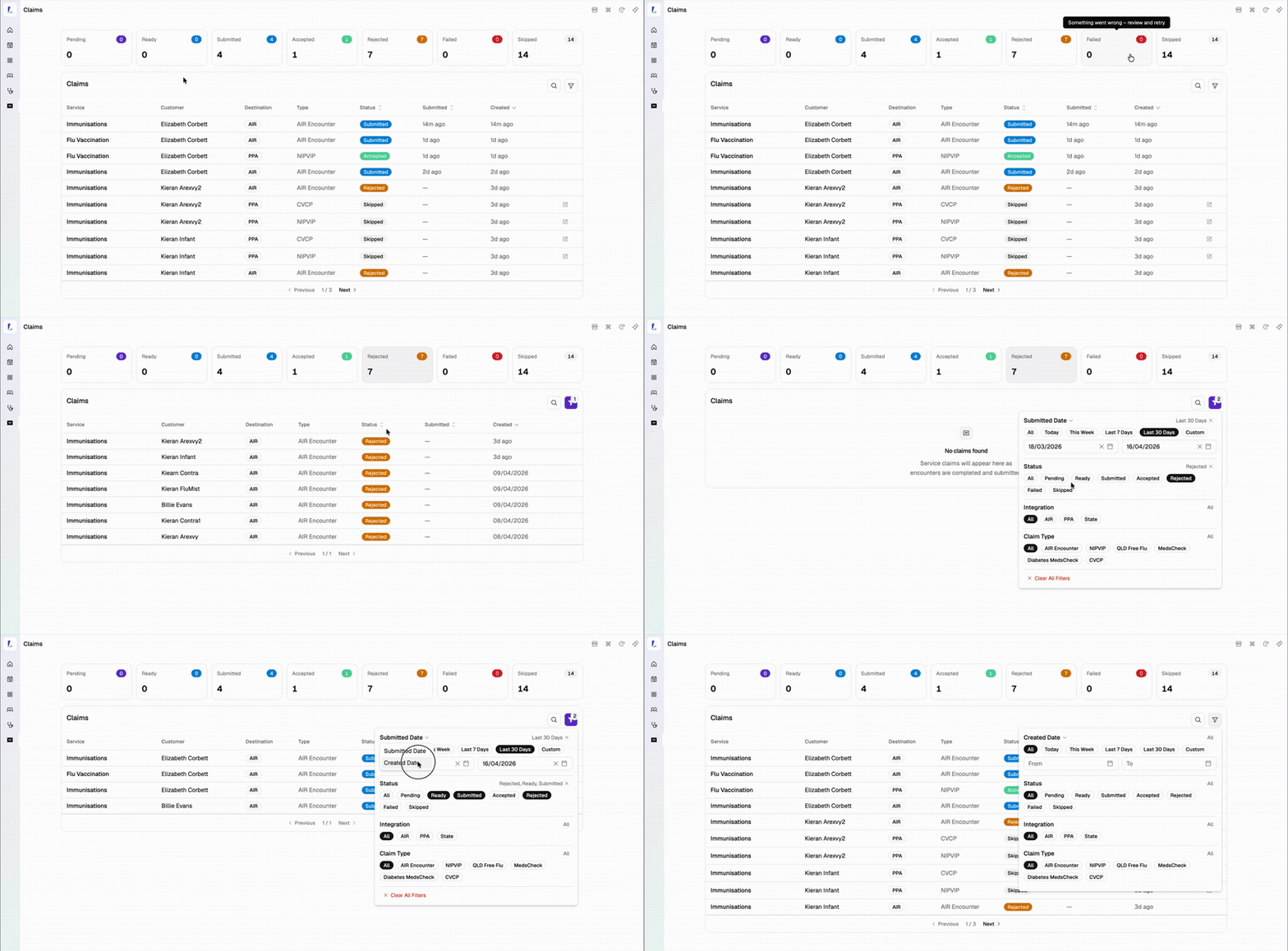
Claims screen updates.

Updated claims screen with date filters, status cards, and pagination

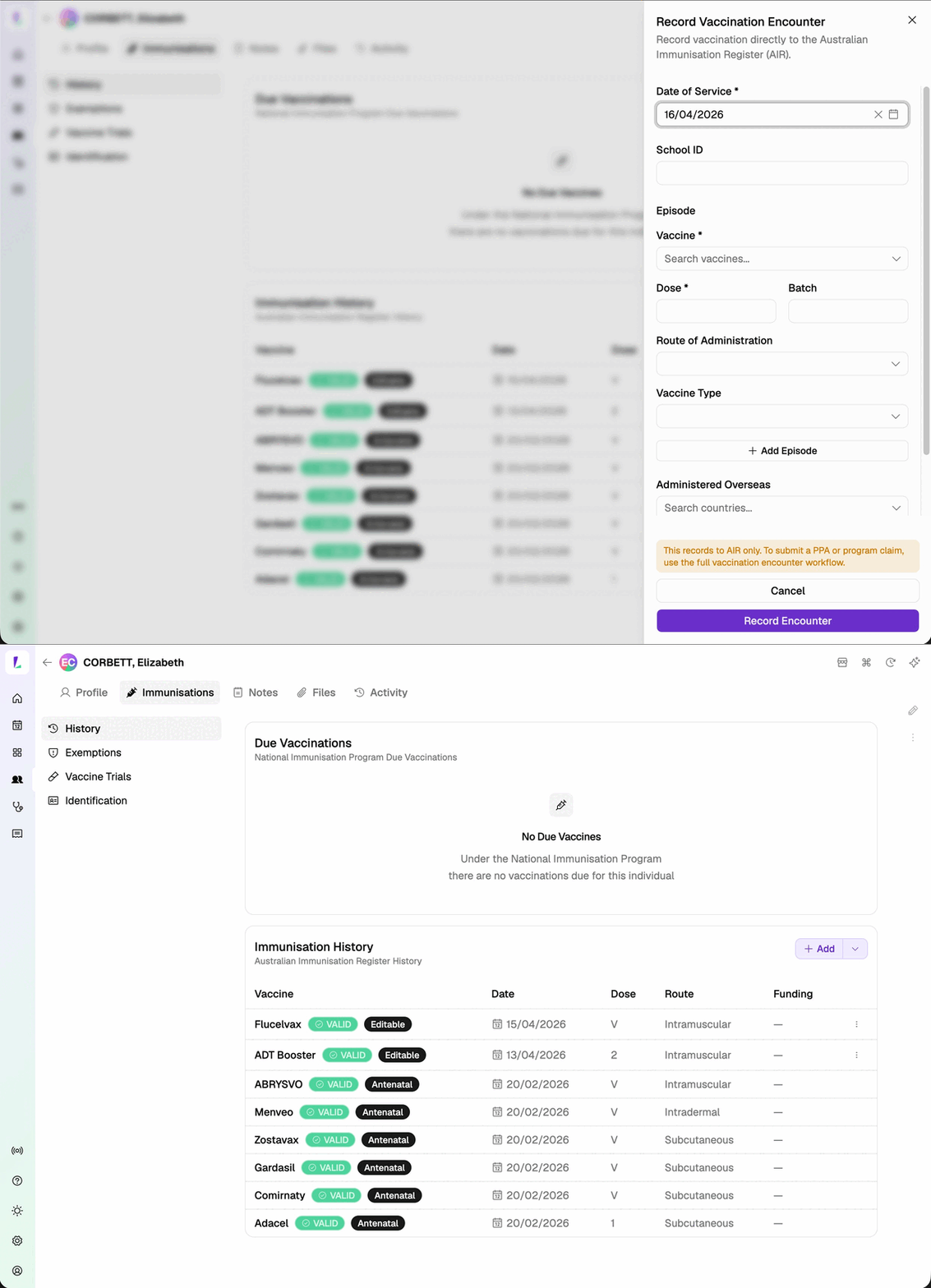
AIR-only reminder when adding a vaccination from a customer’s profile.

Reminder shown when adding a vaccination from a customer's immunisation history

When you tap Add on a customer’s Immunisation History, a reminder now appears: this records directly to AIR only and does not go through PPA or State-funded claiming.

This recording will not appear in Claims or the Service Report.
Improvement

Small things that make a big difference.

14 April 2026

Highlighted from the vaccination pilot.

Immunisation history panel open in a vaccination encounter
Improvement

Small things that make a big difference.

10 April 2026
New

COVID-19 (CVCP) Program claiming now available.

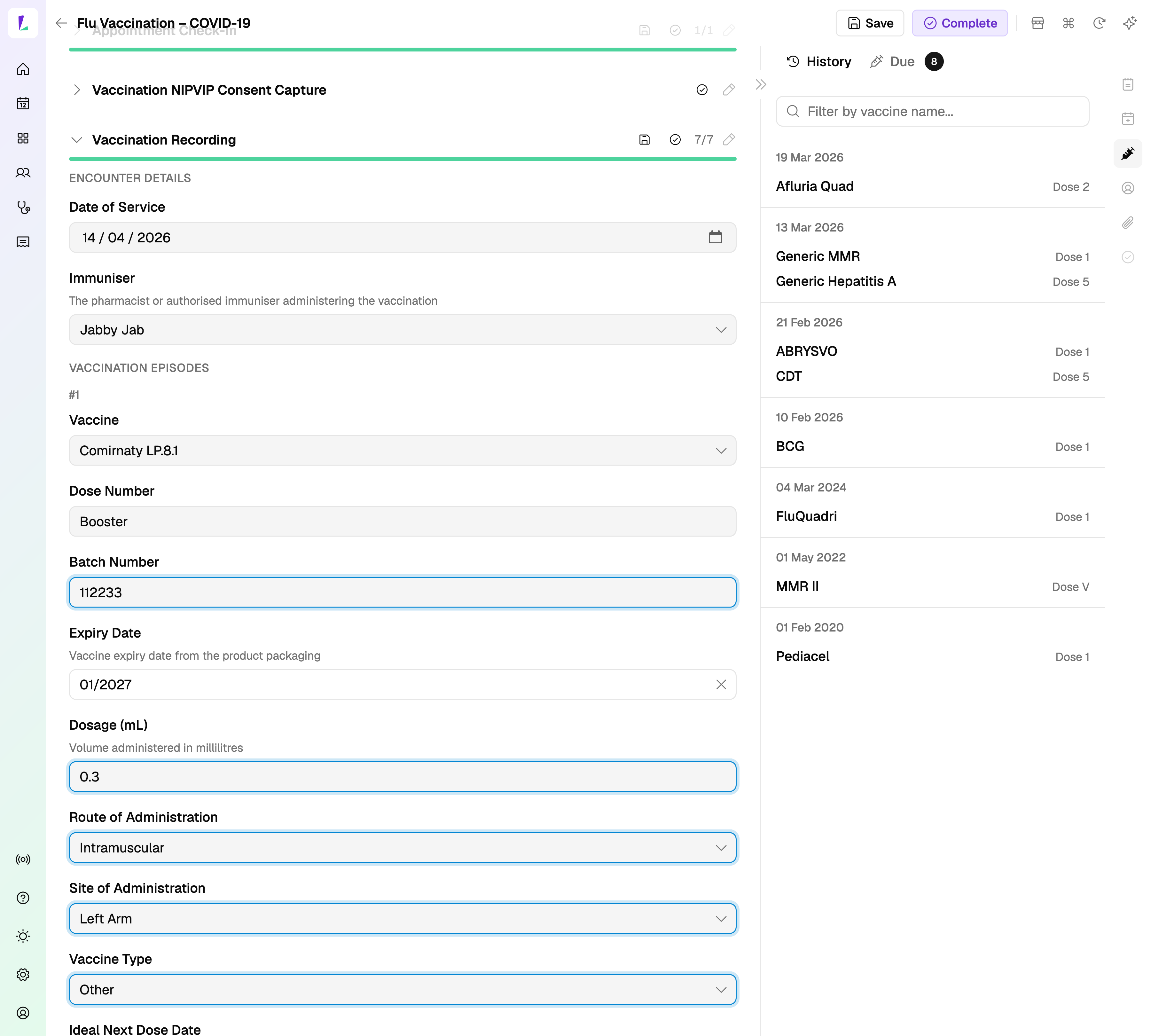
COVID-19 Vaccination in Community Pharmacy (CVCP) Program claiming via the Pharmacy Programs Administrator is now available. Submit CVCP claims directly from Light after recording a vaccination encounter.

COVID-19 CVCP Program claiming in Light

Light automatically evaluates whether a CVCP claim can be made and prepares it for submission. You will still need to review and declare.

When selecting a COVID-19 vaccine such as Comirnaty LP.8.1, the vaccine funding type will automatically populate as ‘Other’ and the claim will be evaluated on completion.

Note: Existing COVID-19 encounters recorded before this release will not be automatically submitted for PPA claiming. We are building a reevaluation tool to support this — we’ll let you know when it’s ready.

New

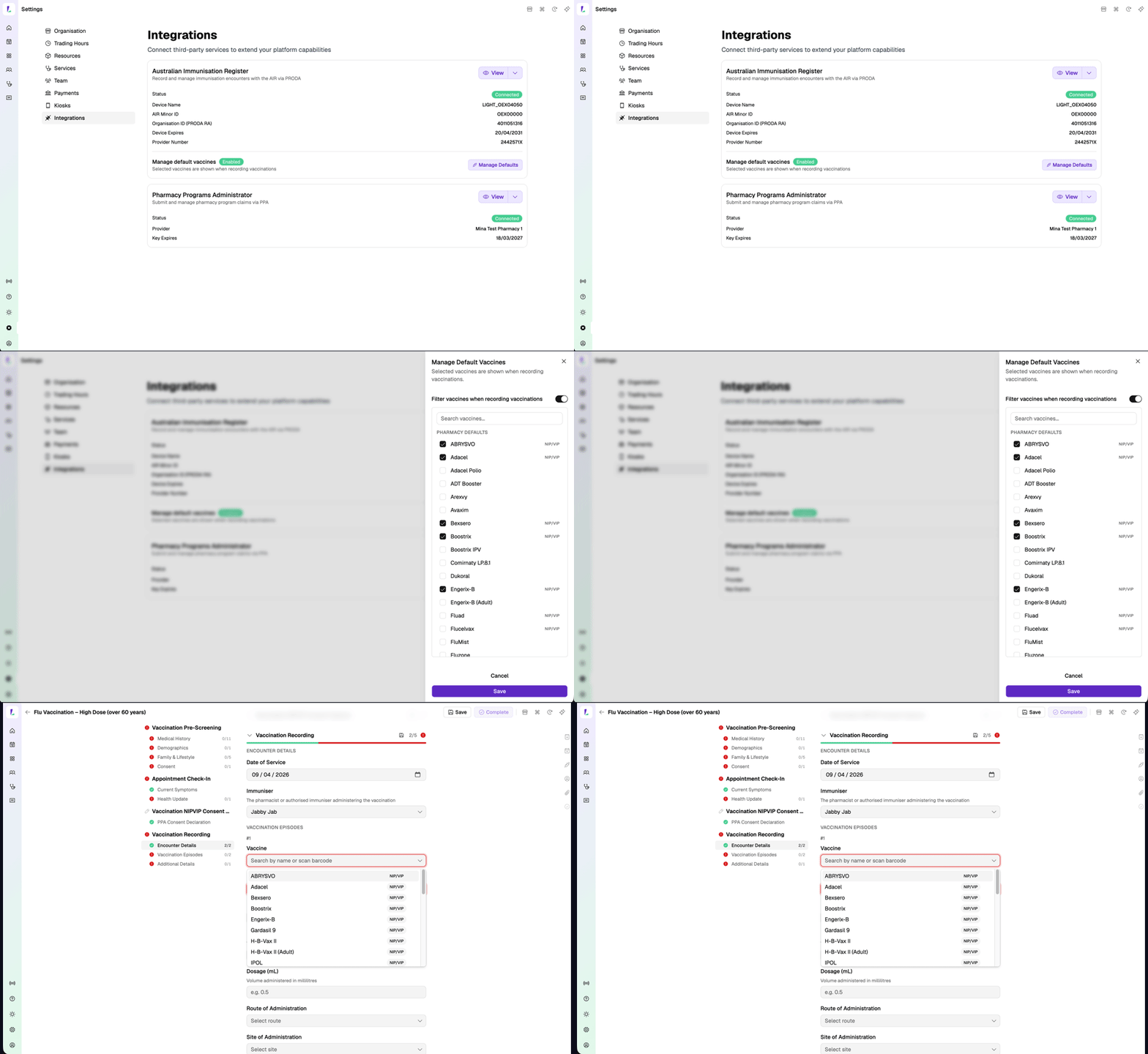
Manage your default vaccine list.

The vaccine list comes from the Australian Immunisation Register (AIR) and can be lengthy. Now you can configure which vaccines your pharmacy stocks so only the relevant ones appear when recording a vaccination encounter.

Head to Settings → Integrations → AIR to set this up.

Managing default vaccines in Settings, then selecting from the filtered list during a vaccination encounter
Improvement

Improvements across Vaccination Encounters.

2 April 2026
Improvement

Small things that make a big difference.

Improvement

Under the hood — faster and smoother.

30 March 2026

Highlighted from the vaccination pilot.

  • Failed AIR submissions now show more detail. Error messages from AIR are now more informative, helping you understand what needs to be corrected and resubmit. This includes fixes that previously caused submissions to fail – for example, entering Booster for a COVID-19 dose.
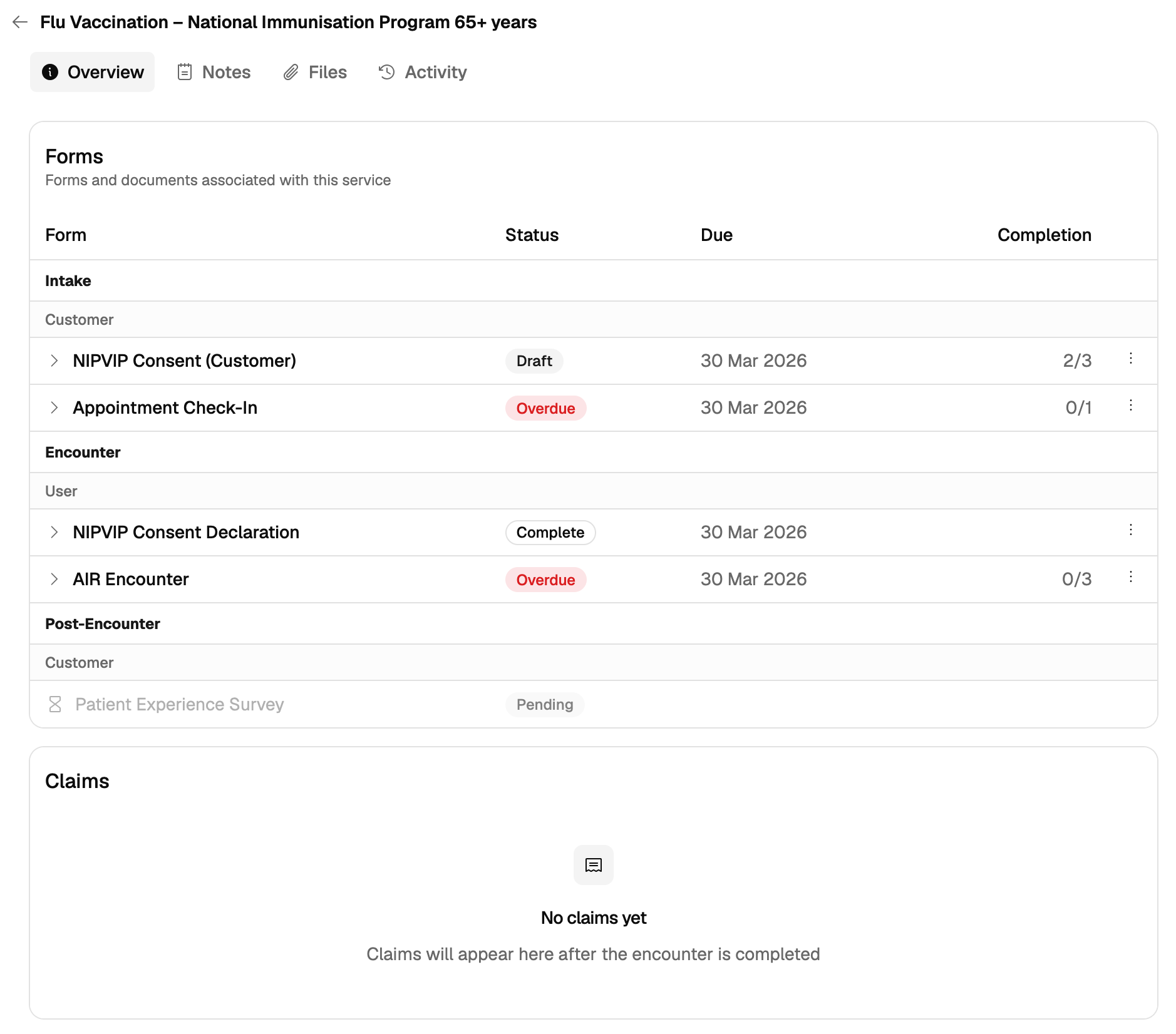
  • Claims card now always visible on vaccination services. The claims card previously only appeared once a claim had been created. It now shows from the start so you always know where to find your AIR and PPA claim status.
Claims card visible on a vaccination service before a claim has been created

Pregnancy status, now pre-populated.

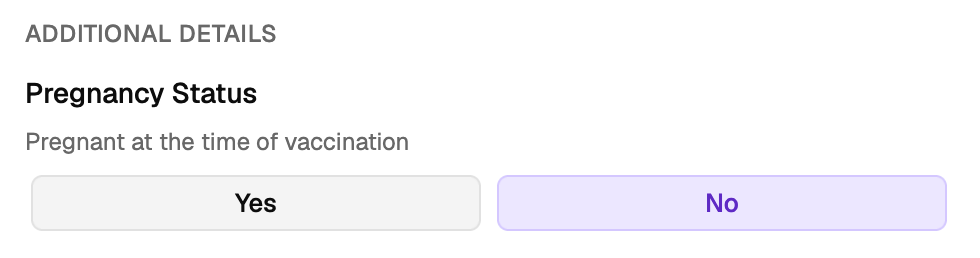
A fix for encounters where gender had not been documented. A Pregnancy Status question – "Pregnant at the time of vaccination" – now appears in vaccination encounters for relevant patients. If the patient completed the prescreener beforehand, this will be pre-populated.

Pregnancy Status question shown in a vaccination encounter
Improvement

Patient profile, one tap away.

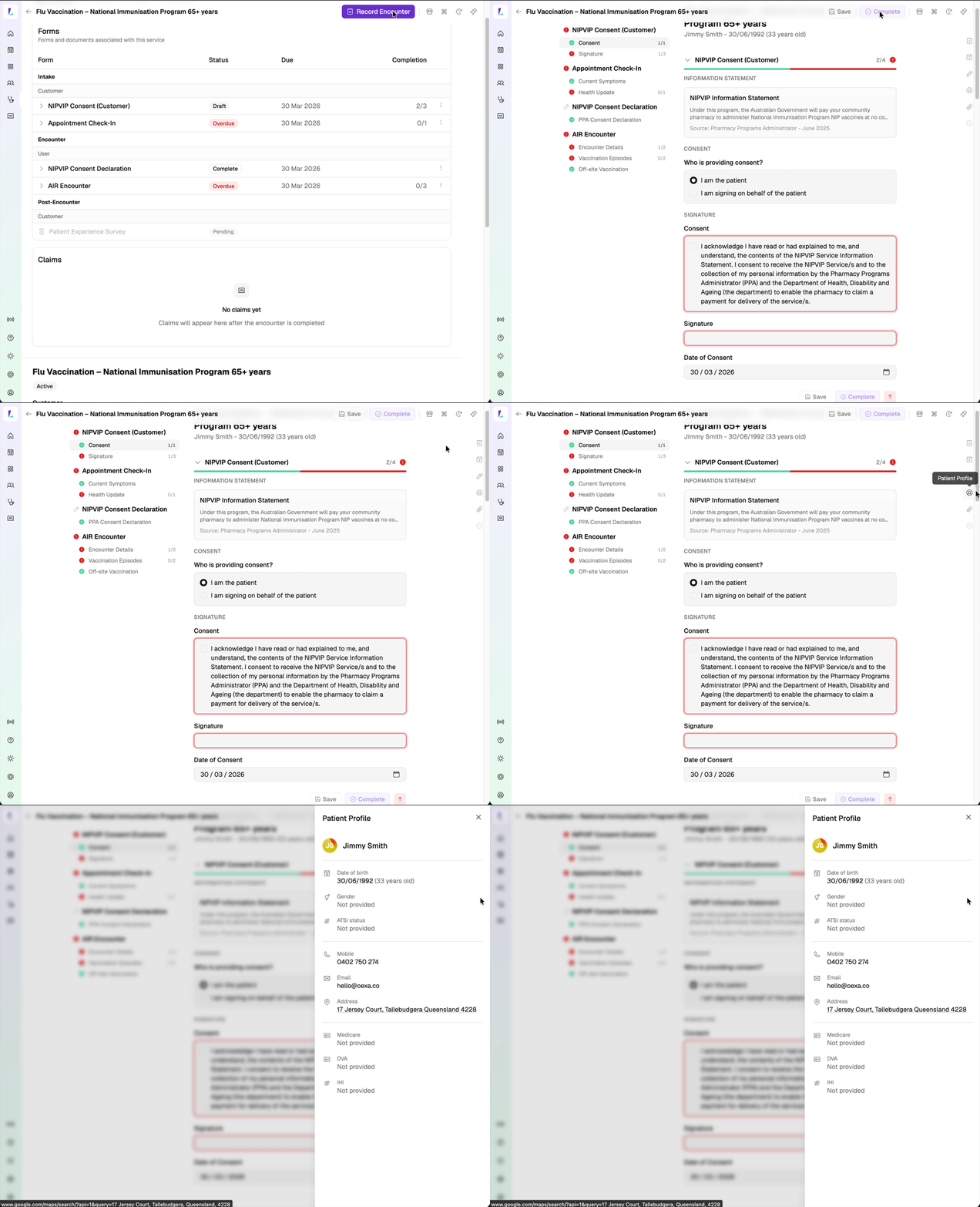
Tap the patient profile icon within the encounter to view the patient's profile without navigating away – keeping the right context at hand while you record.

Tapping the patient profile icon from within an encounter
New

Platform status, at a glance.

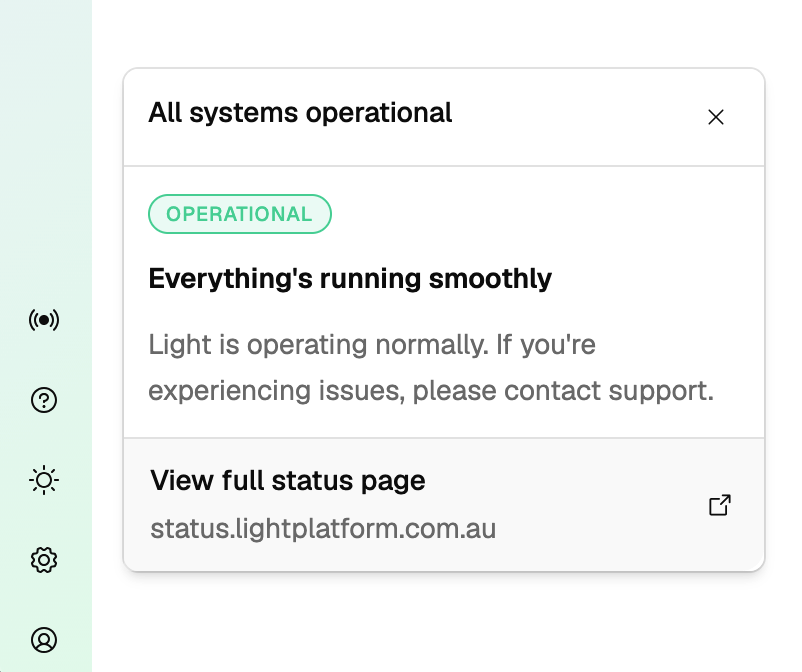
A new status indicator lets you quickly check how Light is running without leaving the platform. Tap it any time for a live update, or visit status.lightplatform.com.au for more detail.

Light platform status indicator
28 March 2026

Highlighted from the vaccination pilot.

Improvement

Small things that make a big difference.

Improvement

Under the hood — faster and smoother.

25 March 2026
New

Customer service notes.

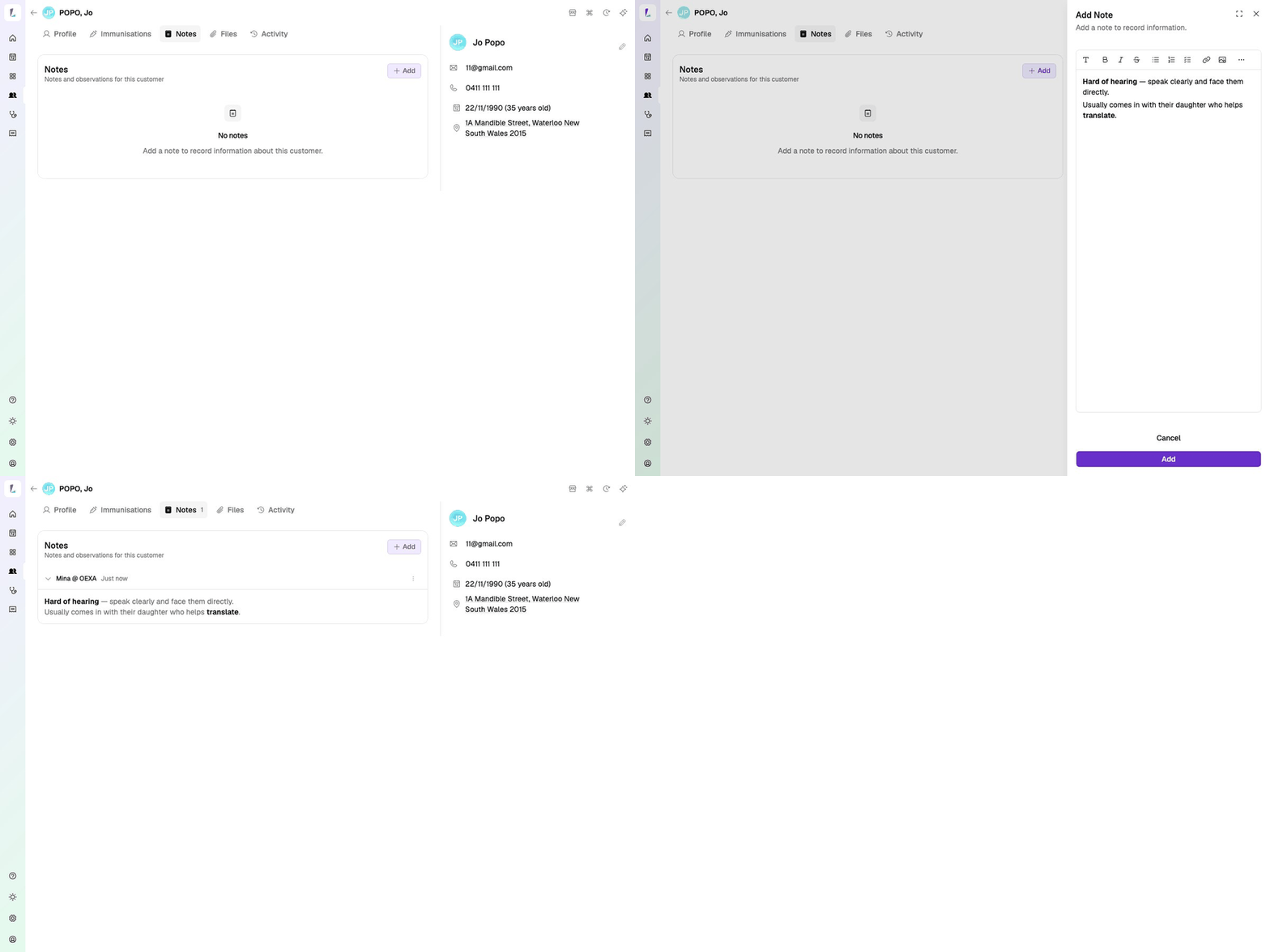
Staff can now add notes against a service for a customer — useful for internal context that doesn't fit anywhere else.

Customer service notes — Notes tab on a customer profile
New

Manage vouchers on existing bookings.

Vouchers can now be managed on existing bookings. Add or edit vouchers on a booking after it's been created, not just at the point of booking.

Improvement

Small things that make a big difference.

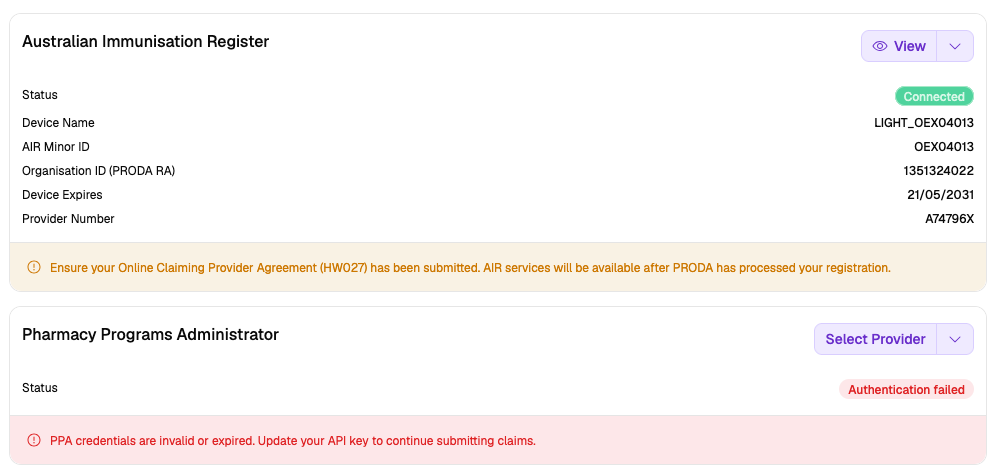
Integrations page showing AIR connected status and PPA error message
Fix

Bug fixes.

19 March 2026
Feature

Connect to PPA.

Light now connects to the Pharmacy Programs Administrator. Once set up, you can submit PPA claims for eligible encounters — directly from Light.

Head to Settings → Integrations, enter your PPA credentials, and you're good to go.

18 March 2026
Improvement

Light looks different. Here's why.

We've updated the Light interface. It's live — you'll see the changes next time you log in.

The layout is more structured and puts more context in front of you. Your bookings, your patients, your consult — all laid out clearly so you spend less time looking for things and more time on the clinical work.

Here's how it's organised:

The new layout uses the full width of your screen — the same thinking behind the practice management systems that GPs and clinicians have relied on for years.

Hundreds of pharmacists saw it at APP Conference and gave us the tick of approval. We're excited for you to start using it.

Feature

Get ready for vaccination recording — set up AIR now.

Vaccination recording is coming to Light. To be ready when it lands, connect Light to the Australian Immunisation Register now. It takes a few minutes and you only do it once.

Jump into Settings → Integrations to get set up.

Feature

Take a sneak peek at vaccination recording.

Take a look at the full vaccination journey — from walk-in to post-visit care — so you know what to expect.

Feature

Pairing a kiosk takes seconds.

We showed this at APP Conference and the response was overwhelming. Any tablet or device with a browser can run the Light kiosk — no app install, no hardware requirements. Help ease your flu clinic and queue — patients can check in, look up a booking, or start a walk-in from the waiting room.

Screens & recordingsContent reflects Light at the time of publishing. The platform updates regularly — we do our best to keep training materials current.
Pharmacy Groups & EnterpriseIf your pharmacy is part of a group or enterprise account, your implementation may differ from what's shown here.
Professional obligationsAs a registered health professional, you remain responsible for complying with all applicable legislation, state-based guidelines, and mandatory requirements relevant to your scope of practice. This guide does not override those obligations.
For pharmacy staff onlyScreenshots and recordings are intended to help pharmacy staff learn to use Light. They are not promotional material and should not be shared with health consumers.
© Oexa Pty Ltd